Deadline timers
Countdowns on your site
Put a deadline timer's countdown on any page that has the Plandalf script. It ticks down each visitor's own deadline and keeps them on the right page for their tier.
Add the countdown
Load the Plandalf script on the page, then add an element with your deadline timer's slug where the countdown should go:
<script async src="https://YOUR-ORG.plandalf.dev/js/plandalf-sdk.js"></script>

<div data-plandalf-promo="your-promo"></div>
The countdown uses the design from the deadline timer's Appearance tab and fills the width of the element it's in. On a page builder, paste the element into an HTML or embed block. Your platform's guide under Websites and builders shows where the script goes.
Design it
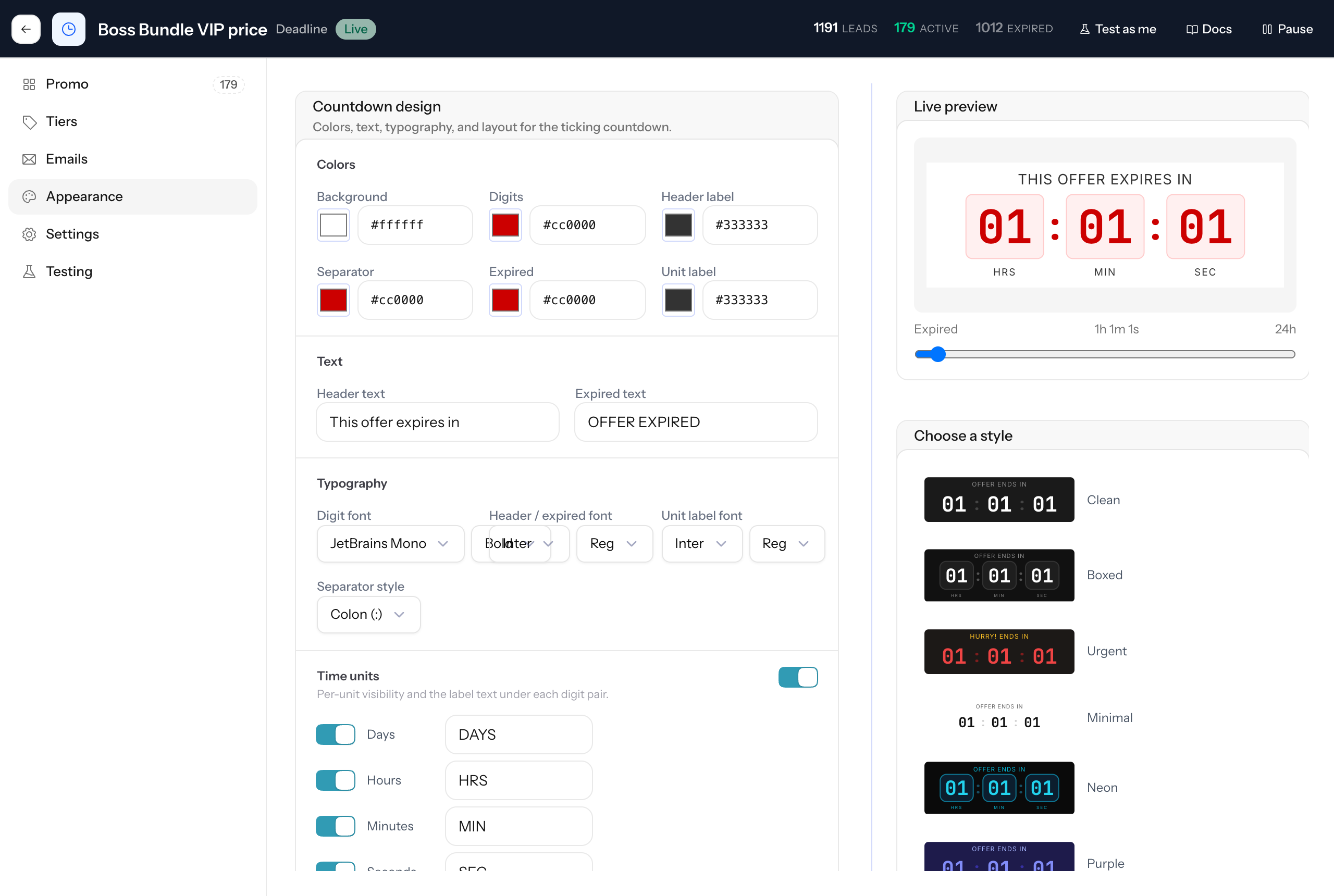
On the Appearance tab, pick a starting point under Choose a style (Clean, Boxed, Urgent, Minimal, Neon or Purple), then change the colours, the Header text, the Expired text, the fonts and which Time units show. Click Save deadline timer. The same design is used on your site and in your emails.
Send visitors to their tier's page
If your tiers have a Destination URL, the countdown element also checks the visitor is on the page for their tier. When their tier ends, or they open a page for a tier they've already passed, Plandalf sends them to the right one. It only moves people forward: someone on a later tier's page stays there. Plandalf doesn't redirect while a Plandalf checkout is open on the page.
To stop redirects on some pages, list them under Settings → Ignore redirect on these pages, one pattern per line:
| Pattern | Matches |
|---|---|
/checkout/* | Every page under /checkout |
?stay=1 | Any page opened with ?stay=1 |
* | Every page, so the countdown never redirects |
Page builder editors such as Divi, Elementor and Beaver Builder never redirect, so you can still edit a deadline timer page.
Apply the tier's price to a checkout
Add data-plandalf-apply-promo to a Plandalf buy button or inline checkout. The checkout opens on the price of the visitor's active tier:
<button data-plandalf-present="your-checkout" data-plandalf-apply-promo="your-promo">Buy now</button>

<div data-plandalf-mount="your-checkout" data-plandalf-apply-promo="your-promo"></div>
Each tier needs Change the cart price when this tier is active ticked, with a price from the same checkout. See Tiers and timing. The button also sends visitors to their tier's page, the same way the countdown does.
Show a countdown inside the checkout
In the checkout editor, add a Timer element and choose the deadline timer under Counts down to. The checkout then enrols the visitor itself, opens on their tier's price and moves to the next price when the timer reaches zero. Keep Hide when deadline timer is inactive on to hide the timer when the deadline timer isn't live.
Identify the visitor
The countdown needs the visitor's ref to show their own deadline. Plandalf reads it from ?pf_ref= in the page address, which your deadline timer link adds, and remembers it in that browser for later visits. For signed-in members, set the ref from code. See Deadline timers from code.
Deadline timer attributes
| Attribute | Values | What it does |
|---|---|---|
data-plandalf-apply-promo | Promo slug. On a data-plandalf-present or data-plandalf-mount element, the checkout it opens uses the promo's active tier price. The SDK also starts the promo's redirect monitor. | |
data-plandalf-hide-on-expire | Present on a promo countdown element: the SDK hides the element when the countdown ends (or the promo has no live config). | |
data-plandalf-no-redirect | Present on a promo element: the auto-scan skips it, so no countdown mounts and no redirect monitor starts for it. | |
data-plandalf-promo | Promo slug. On a plain element the SDK renders the promo's live countdown inside it and watches the active tier. On a data-plandalf-present / data-plandalf-mount element it is the deprecated spelling of data-plandalf-apply-promo. | |
data-plandalf-style | JSON object of style overrides, e.g. {"bg":"#000"}. On a promo widget it adjusts the saved promo style for that one widget; on a referral badge host it sets the badge's CSS variables (--pf-<key>). Malformed JSON is ignored. |
For events when the tier changes or the deadline timer ends, and for mounting a countdown from code, see Deadline timers from code.