Customers and sales
Insights (Beta)
Insights looks across everything you've sold and points out what a list of invoices won't show: when people buy, where they are, and anything worth your attention. It's in Beta, so expect it to change.
Overview
The Overview tab covers all time, in your billing currency.
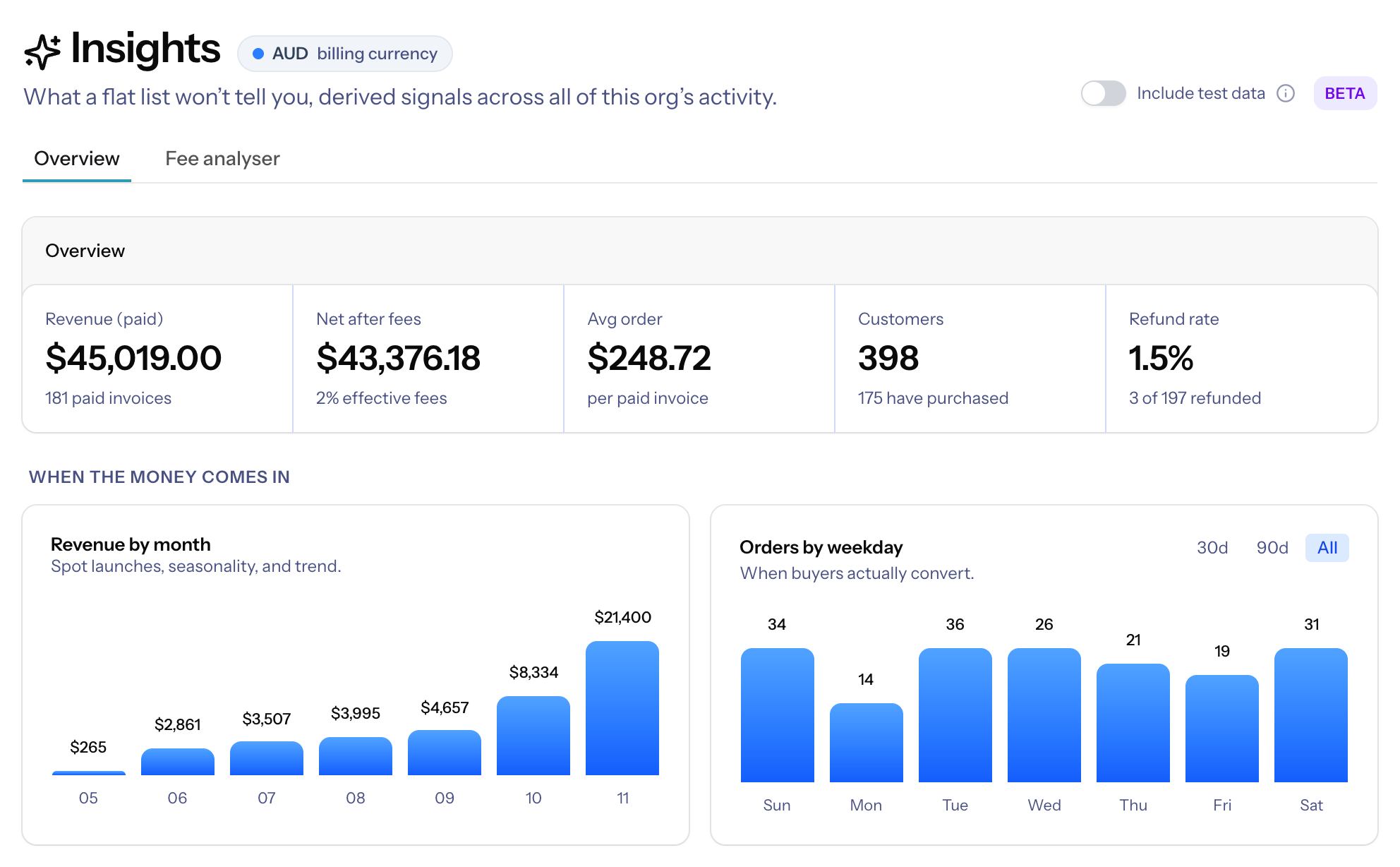
| Figure | Means |
|---|---|
| Revenue (paid) | Total of your paid invoices, and how many. |
| Net after fees | Revenue less Stripe fees, with your effective fee rate. |
| Avg order | Revenue divided by paid invoices. |
| Customers | Everyone with a customer record, and how many of them have bought. |
| Refund rate | The share of charges refunded. |
Below that, Revenue by month shows launches and seasons, Orders by weekday shows which days buyers convert (over 30 days, 90 days or all time), and a map shows where your buyers are, from the billing country on their invoices.
What stands out
This section shows cards only when a number crosses a threshold worth your attention, so a quiet store may see none. Each card is tagged Risk, Watch, Strength or Note. They cover things like:
- One product, or your top 10% of buyers, brings in most of the revenue.
- Most revenue landed in a single month.
- Few buyers come back for a second purchase.
- Discounts are large next to revenue.
- The refund rate is well above normal, or one product causes most refunds.
- Stripe fees are above the usual rate, as happens with many small sales.
- Many people start a checkout and don't finish.
Fee analyser
The Fee analyser tab breaks down what Stripe charged you: card processing, currency conversion, payout fees, Stripe Billing and other Stripe fees, and tax on those fees, as a share of your sales. It compares domestic and international cards and suggests what to do about the biggest costs. Pick one month or all of them; figures are in your Stripe payout currency and show once Plandalf has synced your first month from Stripe.
Test data
Insights leaves out anything marked as test, like Results. Turn on Include test data to count it.