Get started
Add Plandalf to your site
A checkout reaches buyers in one of three ways: a button on your site that opens it, a checkout shown inline in your page, or a hosted link you share anywhere. The first two need one script on your site.
What's your site built with?
Load the script
Paste this before </body> on every page that sells something. Replace YOUR-ORG with your Plandalf subdomain, or copy the exact line from your checkout's Share screen.
<script async src="https://YOUR-ORG.plandalf.dev/js/plandalf-sdk.js"></script>The script loads without slowing your page. It finds Plandalf buttons and inline checkouts when the page loads, and any your site adds later.
Open a checkout from a button
Add data-plandalf-present to any button or link, with your checkout's slug as the value. Clicking it opens the checkout over your page.
<button data-plandalf-present="YOUR-CHECKOUT">Buy Now</button>To open it from your own code instead, see Open a checkout from code.
Show a checkout in the page
Add data-plandalf-mount to an empty element. The checkout renders inside it.
<div data-plandalf-mount="YOUR-CHECKOUT" style="min-height: 480px"></div>Share a hosted link
On the Share screen, choose Hosted link and copy Your checkout link. Use it in emails, social posts, link-in-bio pages, or anywhere you can't add a script.
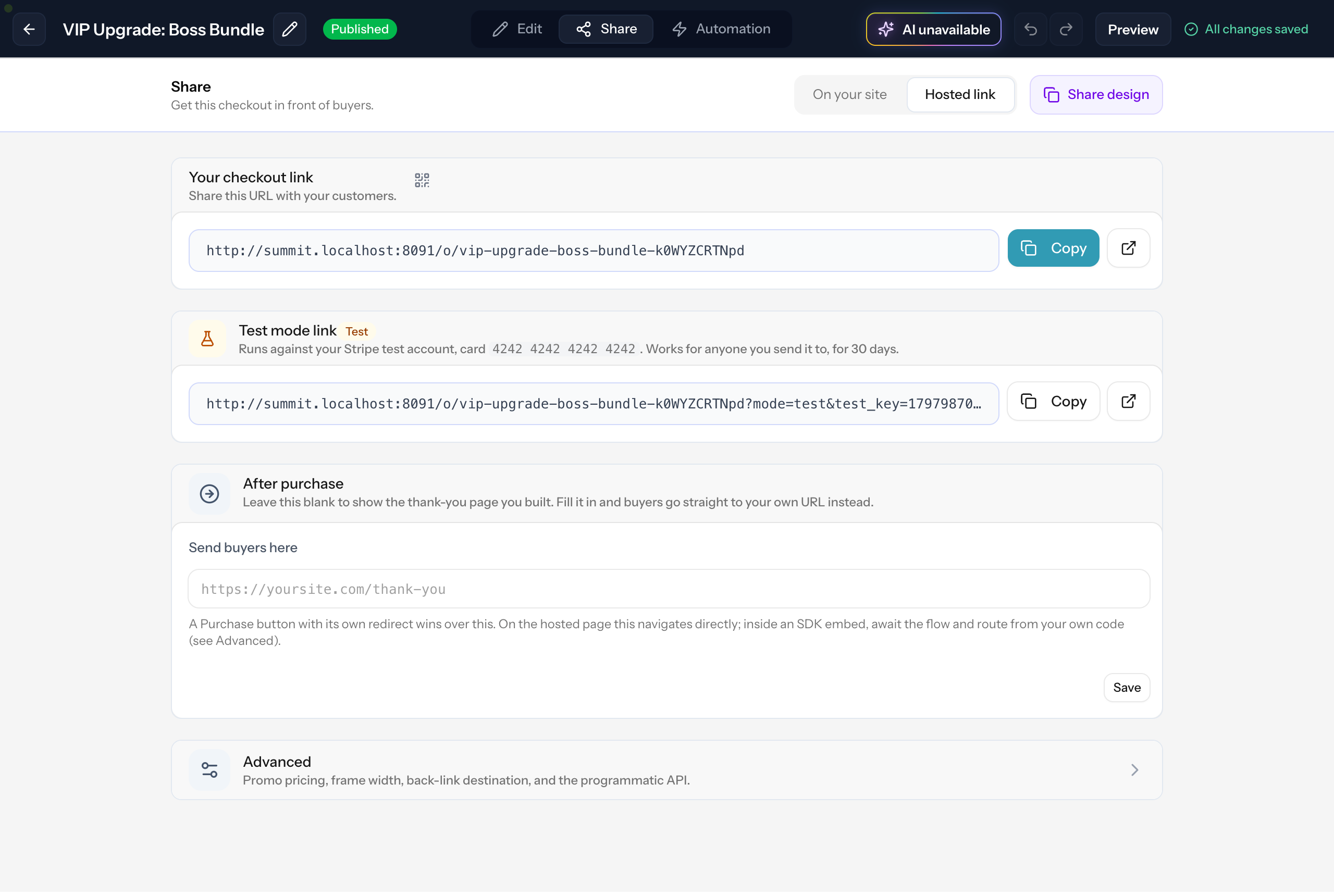
Find your checkout's slug
The slug is the last part of your checkout link, and the Share screen puts it into every snippet for you.
Guides for your platform

 WordPressAdd Plandalf to a WordPress site with a footer plugin or your theme, then add checkout buttons with a Custom HTML block.
 DiviAdd a Plandalf checkout to a Divi site. Paste the script into Divi's Theme Options once, then give a Button module one attribute or use a Code module.
 MemberPressSell MemberPress memberships through a Plandalf checkout with the Plandalf for MemberPress plugin. Plandalf takes the payment; MemberPress keeps access.
 WebflowAdd Plandalf to a Webflow site in Site settings, then open a checkout from any button with a custom attribute.
 CarrdSell from a Carrd site with a hosted checkout link on any button, or add the Plandalf script with an Embed element on Pro Standard.

 FramerAdd Plandalf to a Framer site in Site Settings, then open a checkout from an Embed component.

 SquarespaceAdd Plandalf to a Squarespace site with Code Injection, then add checkout buttons with a Code Block.
 WixSell from a Wix site with a hosted checkout link on any button, or an inline checkout in an Embed HTML element.

 GhostAdd Plandalf to a Ghost site with Code injection, then add checkout buttons to posts and pages with an HTML card.
 ShopifyAdd Plandalf to a Shopify theme to sell upsells, subscriptions and limited-time offers beside your Shopify cart.
 GoHighLevelAdd a Plandalf checkout to a GoHighLevel funnel or website page, then send each buyer back into your HighLevel CRM.
 Brilliant DirectoriesAdd a Plandalf checkout, buy button or countdown to a Brilliant Directories site, then put each buyer on a BD membership plan.
 KajabiAdd a Plandalf checkout to a Kajabi page with a Custom Code block, beside your Kajabi offers.
 beehiivSend beehiiv readers to a hosted Plandalf checkout from posts and website pages, and add a live deadline timer countdown to your emails.
- Plain HTMLAdd Plandalf to any site you edit by hand: one script tag, then a data attribute on any button or element.
 React (Vite)Open Plandalf checkouts from a JSX attribute with the hosted script or from a React click handler with the React package.

 Next.jsAdd Plandalf to the App Router or Pages Router with next/script or the React provider.
 VueOpen Plandalf checkouts from Vue templates with the hosted script or use composables in Vue 3.5 and later.
 NuxtAdd Plandalf to Nuxt with a hosted script in nuxt.config.ts or with the Vue package in a Nuxt plugin.
 SvelteKitAdd Plandalf to SvelteKit with a hosted script or use Svelte stores and actions to open checkouts and display deadline timers.

 AngularAdd a checkout to an Angular template with the hosted script, or use the Angular package to open one from a component.
 AstroAdd Plandalf to an Astro site in your base layout, then open checkouts from attributes in any page or component.