Developers
Identify buyers with a signed token
When a buyer is logged in to your site, you can tell Plandalf who they are. Their checkout then knows their email and name, charges their existing Stripe customer, and can change their current subscription. You do it with a short token your server signs with an API key.
plandalf.identify() only accepts a signed token. If you pass an email address, the server rejects it, the console shows a warning and the checkout carries on without an identity. To fill in a buyer's email without identifying them, use properties (see Open a checkout).
How signed identity works
Your server signs a token
A JWT signed with HS256, using one of your API keys as the secret. Its header's
kidis that key's ID.Your page passes it to the SDK
plandalf.identify(token)checks it with Plandalf, keeps it in the browser and sends it with every checkout from then on.Plandalf verifies it on every checkout
The signature has to match one of your organization's active API keys, so nobody can make a token for someone else.
Find your key and its ID
Go to Settings → API Keys. Use a Test key while you build and a Live key in production (Create API Key if you don't have one). You need two values:
- The full key, which starts with
test_orlive_. It's shown once when you create it; after that, use Reveal key in the row's menu and enter your password. This is the signing secret. - The Key ID from the table, which goes in the token's
kidheader.GET /api/v1/organizationreturns it too, asapi_key.id.
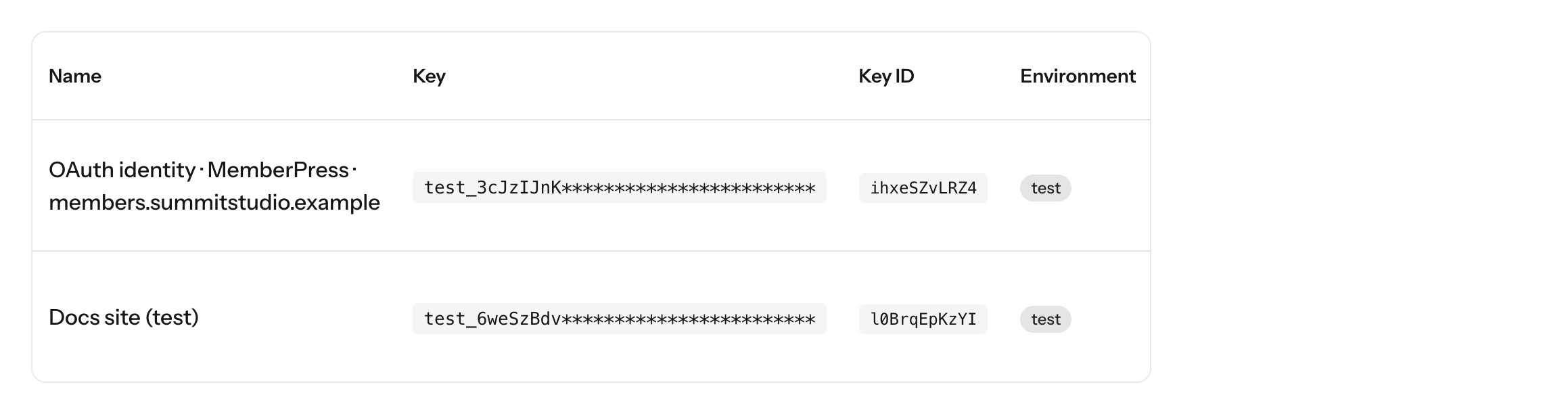
Save both as environment variables on your server, such as PLANDALF_API_KEY and PLANDALF_API_KEY_ID.
The API key can change your catalog and read your customers. Keep it out of page code, page builders' custom code and app bundles. Only the signed token goes to the browser. If the key leaks, delete it and create another.
Sign the token
Keep tokens short-lived: an hour is plenty. Each example signs sub, email and name for the logged-in user.
Node.js
With jsonwebtoken (npm install jsonwebtoken):
import jwt from "jsonwebtoken";

export function plandalfToken(user) {
  return jwt.sign(
    { sub: String(user.id), email: user.email, name: user.name },
    process.env.PLANDALF_API_KEY,
    { algorithm: "HS256", expiresIn: "1h", keyid: process.env.PLANDALF_API_KEY_ID },
  );
}
On an edge runtime without Node's crypto module, such as Cloudflare Workers, sign the same claims with jose instead.
PHP
With firebase/php-jwt (composer require firebase/php-jwt):
use Firebase\JWT\JWT;

function plandalf_token(array $user): string
{
    $now = time();

    return JWT::encode([
        'sub' => (string) $user['id'],
        'email' => $user['email'],
        'name' => $user['name'],
        'iat' => $now,
        'exp' => $now + 3600,
    ], getenv('PLANDALF_API_KEY'), 'HS256', getenv('PLANDALF_API_KEY_ID'));
}Python
With PyJWT (pip install pyjwt):
import os
import time

import jwt


def plandalf_token(user):
    now = int(time.time())
    return jwt.encode(
        {"sub": str(user["id"]), "email": user["email"], "name": user["name"], "iat": now, "exp": now + 3600},
        os.environ["PLANDALF_API_KEY"],
        algorithm="HS256",
        headers={"kid": os.environ["PLANDALF_API_KEY_ID"]},
)Ruby
With the jwt gem:
require "jwt"

def plandalf_token(user)
  now = Time.now.to_i
  payload = { sub: user.id.to_s, email: user.email, name: user.name, iat: now, exp: now + 3600 }
  JWT.encode(payload, ENV.fetch("PLANDALF_API_KEY"), "HS256", { kid: ENV.fetch("PLANDALF_API_KEY_ID") })
endGo
With github.com/golang-jwt/jwt/v5:
import (
	"os"
	"time"

	"github.com/golang-jwt/jwt/v5"
)

func PlandalfToken(id, email, name string) (string, error) {
	now := time.Now()
	t := jwt.NewWithClaims(jwt.SigningMethodHS256, jwt.MapClaims{
		"sub": id, "email": email, "name": name,
		"iat": now.Unix(), "exp": now.Add(time.Hour).Unix(),
	})
	t.Header["kid"] = os.Getenv("PLANDALF_API_KEY_ID")
	return t.SignedString([]byte(os.Getenv("PLANDALF_API_KEY")))
}Token claims
Every claim is optional, but set sub: Plandalf uses it to find the buyer's unfinished checkout.
| Claim | What it does |
|---|---|
sub | Your stable id for the user. |
email, name | Fill in the buyer's email and name. |
customer | Their existing Stripe customer id (cus_…), so payments go on that customer. customer_id and id work too. |
subscription | Their current Stripe subscription id, for upgrades and plan changes. subscription_id works too. |
grp | The group, team or account the user belongs to in your app. |
mode | "test" lets this buyer open test checkouts. See Test with a token. |
referral_token | A partner referral token (rt_…) to credit the sale to that partner. |
iat, exp | When the token was issued and when it expires, in Unix seconds. |
A valid token doesn't override your checkout's rules: the customer and subscription have to belong to the Stripe account your checkout uses. A live cus_ id doesn't exist in your Stripe test account, so in test mode use a test customer.
Hand it to the SDK
Get the token to the page however suits your app: render it into the page (with @json in a Laravel Blade view, or a template variable in Django or Rails), or fetch it from an endpoint for logged-in users. Then call identify() before opening the checkout. It resolves true when Plandalf accepts the token.
plandalf('ready', async () => {
  const { token } = await fetch('/plandalf-token').then((r) => r.json());
  if (await plandalf.identify(token)) {
    // every checkout from here on knows who the buyer is
  }
});
The SDK keeps the token in localStorage, so it survives page loads, and sends it with every request. You can also pass it when the SDK starts, as user in plandalf('init', …) or plandalf('configure', …). The command form, plandalf('identify', token), doesn't wait for the check.
When they log out
plandalf.reset();reset() forgets the token. The browser's anonymous id stays, so the next checkout is anonymous.
For one checkout only
Pass user to present() or mount() to use a different token for that checkout, for example in admin tools that buy on a customer's behalf:
plandalf.present('YOUR-CHECKOUT', { user: tokenForThisCustomer });Test with a token
Add "mode": "test" to the token and open the checkout with mode: 'test'. Plandalf runs it in test mode on any site, as long as you have a Stripe test account connected.
// on your server
jwt.sign({ sub: String(user.id), email: user.email, mode: "test" }, process.env.PLANDALF_API_KEY,
  { algorithm: "HS256", expiresIn: "1h", keyid: process.env.PLANDALF_API_KEY_ID });

// on the page
await plandalf.identify(token);
plandalf.present('YOUR-CHECKOUT', { mode: 'test' });
Anyone holding that token can open test checkouts, so only issue it in development. On your own test domains you don't need it; see Test mode.
Identity and returning buyers
If you also turn on session continuity, Plandalf decides each time which checkout to open:
| The browser has | Plandalf opens |
|---|---|
| A saved checkout, no token | The saved checkout |
| A token, no saved checkout | The buyer's unfinished checkout for this offer, or a new one |
Both, for the same buyer (sub matches) | The saved checkout |
| Both, for different buyers | A new checkout for the token's buyer, so nobody sees someone else's cart |
For a returning buyer, Plandalf merges the checkout's metadata into their Stripe customer's metadata: keys you pass are updated and keys you don't pass are kept.
Guest checkout
If you don't call identify(), checkouts are anonymous. Plandalf creates a customer from the details the buyer types in. That's the right choice for one-off sales and sites without logins.
If identify() returns false
The console shows [Plandalf] identify() rejected with one of these codes:
| Code | Fix |
|---|---|
invalid_token | The value isn't a JWT (an email address or an API key, say), or it isn't HS256. Sign a token as above. |
invalid_key | The kid header doesn't name an active API key. Use the Key ID from Settings → API Keys, not the key itself. |
invalid_signature | The token was signed with a different secret. Sign with the full key whose ID is in kid. |
expired_token | Sign a fresh token. Fetch a new one when the old one is close to exp. |
token_not_yet_valid | iat or nbf is in the future. Check your server's clock. |
"Could not validate the customer JWT" means the SDK couldn't reach Plandalf to check it: make sure the script loads from your own organization's host.
WordPress and MemberPress
The Plandalf WordPress plugin signs tokens for logged-in members for you, through its site connection. See MemberPress and Site connection.