
Custom API
Use Send Webhook in a Plandalf sequence to send a JSON request to your server. You choose the destination, method, payload and headers. Your server performs the next step, such as recording an order or provisioning access.
Note. Verification status On 2 October 2026, the local editor sent a synthetic request to a local receiver. A second request returned the same unique record. A deliberate HTTP 503 exposed a false success message; a local repair now shows the failure and clears the previous test result. Recovery to HTTP 200 was replayed. This repair has not been deployed. The sequence remains paused. A new paid checkout, automatic delivery, authenticated endpoint, promo enrolment and affiliate sale have not been replayed for this integration.
Choose your path
| Product | Start here | What to verify |
|---|---|---|
| Checkouts | Create the checkout, then add the action below | Paid invoice and matching destination record |
| Automations | Configure Send Webhook | Request, HTTP status, response and duplicate handling |
| Timers / Promos | Connect a campaign | Stable participant, deadline and checkout price |
| Affiliates | Choose the sale source | Attributed sale, commission, duplicate and refund |
Before you start
- A Plandalf organization and a test checkout.
- A server endpoint you control. For a hosted Plandalf account, use a reachable HTTPS endpoint.
127.0.0.1in these screenshots works only because both the local Plandalf app and receiver ran on the same computer. - A sandbox receiver that records the result without sending messages, granting real access or fulfilling real orders.
- Access to the receiver’s records and the payment provider’s test records.
Keep a receiver credential in your team’s approved password manager. Record only its vault reference in a replay recipe. Use a dedicated sandbox credential with the permissions your receiver needs. Never put a private API key in website code, a guide, a screenshot or a test report.
The action’s Headers setting can send credentials to your destination. Its configuration and test details can display those values; treat them as sensitive. This guide’s local receiver uses synthetic data and no credential. Safe masked credential entry and storage are not verified here.
Prepare your checkout
Follow Create your first checkout to configure a product and price. Confirm the payment connection is in test mode before paying.
Open the checkout editor, choose Automation, then New. The local editor created a paused sequence with a Checkout completed trigger linked to that checkout. Keep it off while preparing the destination.
Expand the trigger and check its checkout selection. Test the trigger and inspect the selected sample before using its fields. A trigger test may use an existing invoice or generated sample data; it does not collect a payment.
Configure Send Webhook
- Choose Add an action.
- Choose the Plandalf app and Send Webhook, then Create Action.
- Open 2. Config and give the action a recognizable name.
- Set Webhook URL to your sandbox receiver and HTTP Method to
POST. - Enter the JSON your destination expects in Payload. Add headers only when your destination requires them.
- Choose Save & Continue.
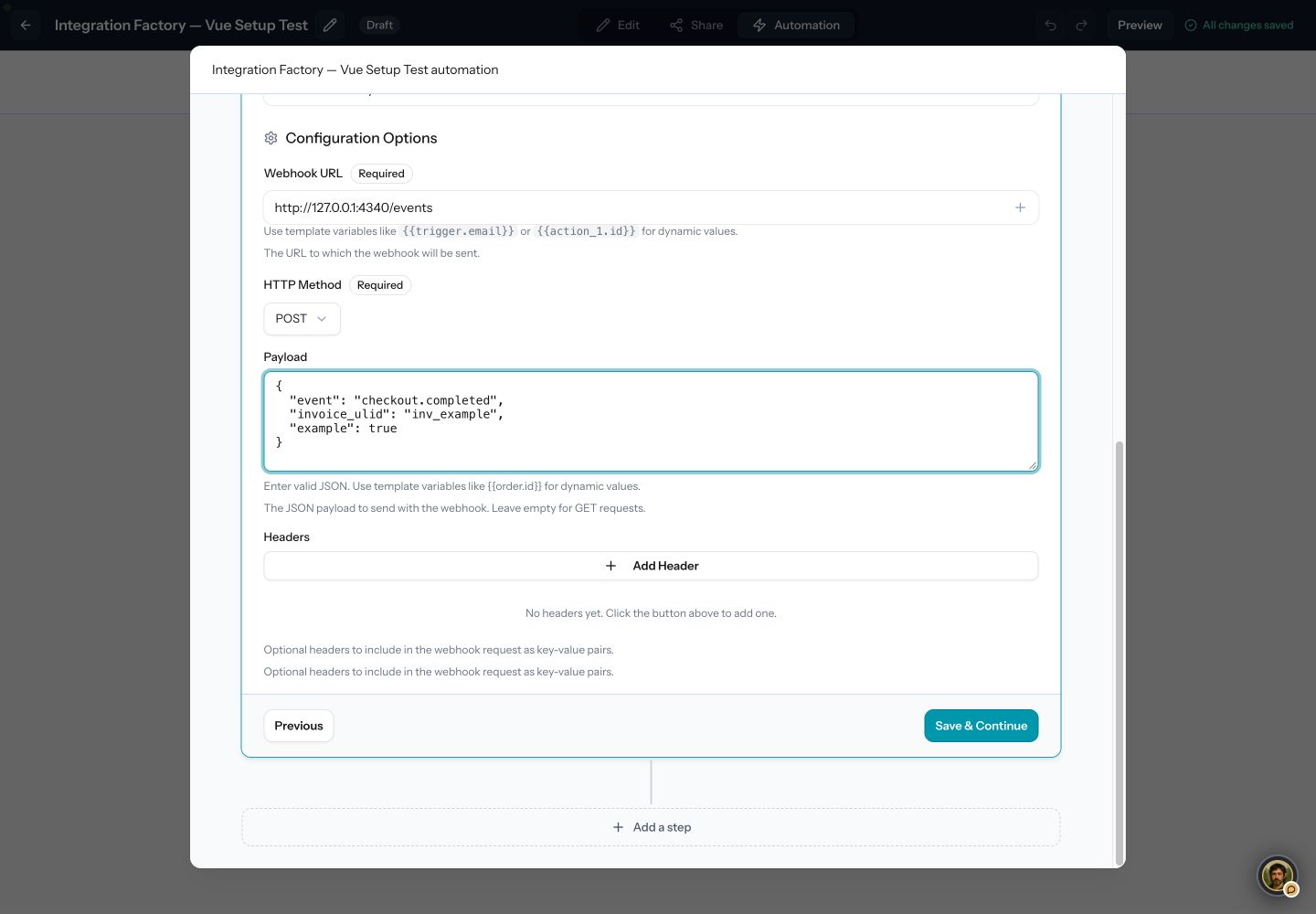
Local setup using a fixed sample record. Replace the local URL with your own reachable sandbox endpoint.
- Set the receiver URL. The local address shown is not a hosted-account destination.
- Start with synthetic JSON, then verify the mapped trigger fields separately.
- Add only the headers your receiver requires. Keep their values out of screenshots.
Start with a fixed sample
This is the exact synthetic payload used in the local run:
{
  "event": "checkout.completed",
  "invoice_ulid": "inv_example",
  "example": true
}
The receiver accepted it, recorded the event and invoice identifier, and returned:
{"accepted":true,"duplicate":false,"uniqueRecords":1}For real checkout data, replace the fixed invoice identifier using the tested trigger’s variable picker. The current Checkout completed source exposes invoice_ulid, invoice_number, customer_email, customer_name, total, currency, offer_id and line_items, among other fields. It does not send all those fields automatically: include only what your endpoint needs.
For example, this mapping is source-checked but still needs a paid-event replay in your account:
{
  "event": "checkout.completed",
  "invoice_ulid": "{{trigger.invoice_ulid}}",
  "invoice_number": "{{trigger.invoice_number}}"
}
Have the receiver reject an empty identifier. Use the paid invoice identifier, event type and organization scope as a durable deduplication key. Enforce uniqueness in storage before creating an order or granting access.
Test the destination
Open 3. Test, choose Run Test, then inspect Action Output and the destination record.
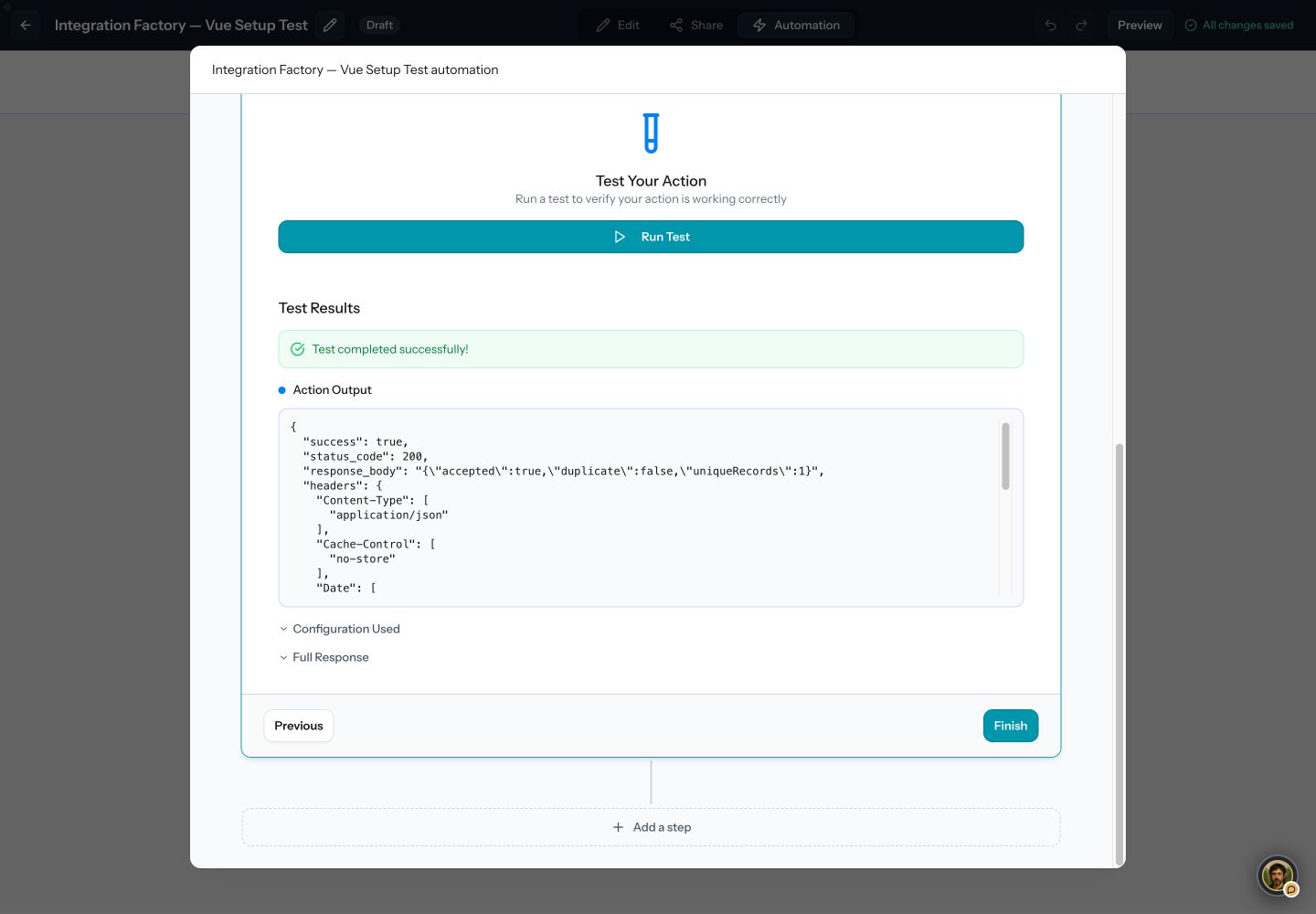
The receiver acknowledged the synthetic request. This proves an action test reached the endpoint; it does not prove a paid checkout fired the sequence.
- Check status_code: this receiver returned HTTP 200.
- Read the destination response and reconcile it with the destination record.
Run the same test again. The local receiver returned duplicate: true and uniqueRecords: 1. That behavior belongs to the receiver; your own endpoint must implement its own persistent deduplication.
Check failures explicitly
Warning. Verify failure handling in your running version The original local run incorrectly showed success for HTTP 503. A local repair now rejects non-2xx responses, clears old successful test results and requires a new successful test before finishing. The repair is not deployed. Check the actual response and destination record in your running version. Automatic workflow retries remain unverified.
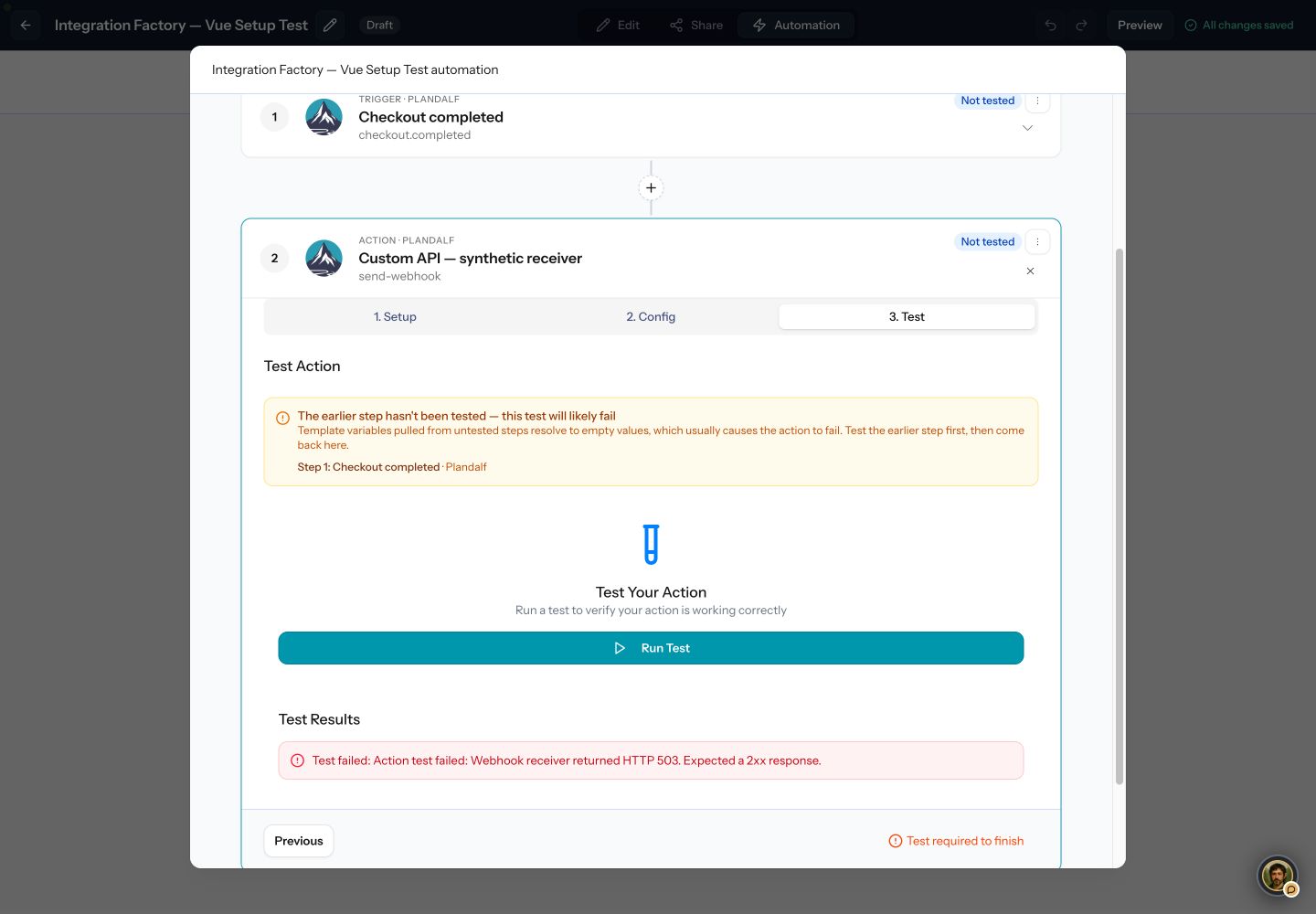
Local repair: the intentional HTTP 503 now fails the test. After reload, the action remains Not tested. Restoring the receiver and testing again returned HTTP 200.
- A failed attempt removes the previous Tested badge.
- HTTP 503 is a failure. Restore the receiver, then run a new test.
- Finish stays unavailable until a new test succeeds.
The current workflow source records a failed step and continues to later steps. Do not rely on a failed webhook to stop later fulfilment actions. Verify the event log and recovery procedure with an isolated sandbox run before enabling the sequence.
Verify a paid checkout
After the fixed sample works, use the tested trigger fields and your authenticated sandbox destination. Enable only this test sequence, complete a new test payment, and check all of the following:
- The payment provider shows the successful test payment.
- The Plandalf invoice is paid and its amount and currency match.
- The sequence’s Events view shows this checkout’s run.
- Your receiver has a matching invoice identifier and the intended result.
- Replaying the same event creates no second order or entitlement.
- A declined checkout grants no access and creates no paid-order record.
- A failed receiver request is visible and has a tested recovery procedure.
Do not infer payment or access from the browser’s thank-you page alone. Keep production fulfilment disabled until this replay passes.
Use signed payment events when needed
Send Webhook does not automatically add a Plandalf signature. Configurable headers are separate from signature verification.
Plandalf also has a webhook endpoint API for signed events. The implementation registers endpoints through POST /api/v1/webhook_endpoints, returns a signing secret at creation, and sends Plandalf-Signature and Plandalf-Event-Id headers. Its delivery worker records responses and schedules retries. This is a separate delivery path with its own payload contract.
That endpoint requires a public HTTPS URL. Keep its signing secret on your server, verify the signature against the raw request body and reject stale timestamps before processing. Deduplicate by event ID. Use the MemberPress technical reference for an existing client example of this protocol. The signed API path has not been replayed in this Custom API guide.
Connect a promo
Create the campaign using Create a promo, then connect the checkout and countdown using Custom HTML. Verify the price before and after a tier changes.
If your backend supplies the enrolment event, use a Plandalf Webhook Trigger followed by Enroll in Promo. Copy that trigger’s actual catch URL and map your stable participant identifier in the action. Keep the catch URL private and send the same identifier when the same person returns. An arbitrary API call does not automatically bind a participant to a checkout.
This inbound enrolment path still needs its own replay: first enrolment, repeated enrolment, returning participant, deadline, and matching checkout price. The outbound action test above does not prove these outcomes.
Track affiliate sales
Choose the source of the paid sale before configuring reporting:
- Plandalf checkout: follow Affiliates with Plandalf checkout. Verify the referral reaches the checkout and the paid invoice creates the expected attributed sale.
- Your own checkout: capture the referral context, then report the confirmed payment from your server using the Affiliate sales API. Follow its separate refund and duplicate rules.
Use an approved vault reference for your server’s API key. Keep test and live records separate. Test the initial sale, duplicate, refund and renewal where applicable. Sending a generic webhook to your server does not itself create an affiliate commission.