

Developer integration
Send checkout data to your API
Choose the JSON your server receives after checkout. Configure the request, inspect the response and verify the destination record.
Requires your own endpoint. Start with a sandbox receiver.
 StripeCustom API
plandalf.present()checkout.completedwebhook → your API
Overview
How Custom API and Plandalf split the work
Plandalf sends the configured request. Your server records the order or performs the next step.
Webhook path available
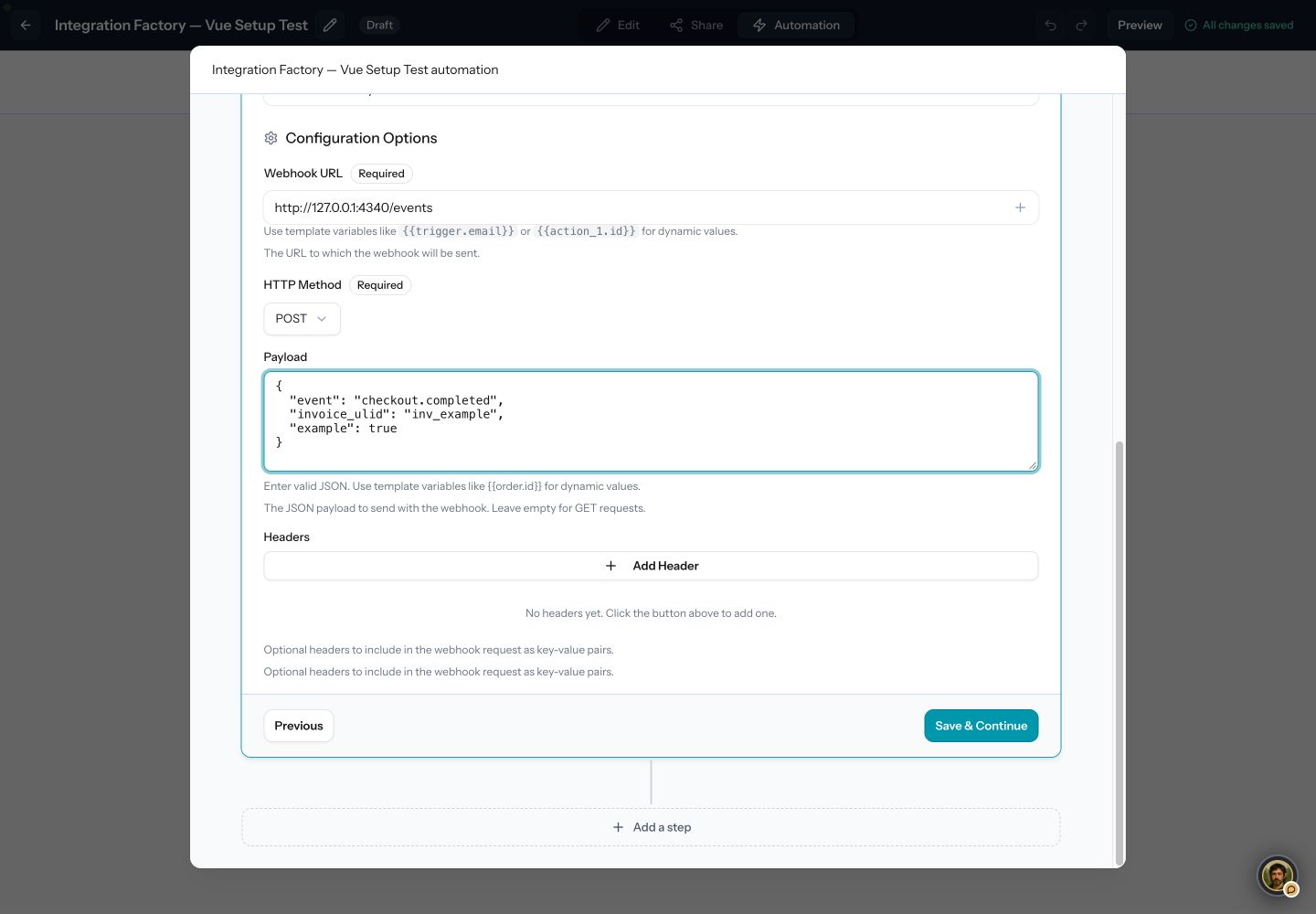
Add Send Webhook to a checkout sequence and choose the URL, method, JSON payload and headers. The guide shows a real local action test and duplicate handling. A paid-trigger replay and failure recovery remain required before fulfilment goes live.
Custom API owns
- Your app, login and permissions
- Granting access in your own database
Plandalf owns
- Opening the checkout
- Payment, receipts and subscriptions
- Telling your backend what was bought
Set it up
Connect Custom API in three steps
The short version. The Custom API setup guide has the full walkthrough and the test-mode checks.
- 1
Create a paused sequence
Open your test checkout, choose Automation, then New. Check the linked Checkout completed trigger and keep the sequence off during setup.
- 2
Configure the request
Add Plandalf → Send Webhook. Set your sandbox URL, POST method and JSON payload. Use only the headers your receiver requires.
- 3
Test and reconcile
Run the action test, check the HTTP status and destination record, then replay the same request. Finish with a new sandbox payment and a matching paid invoice.
- Also with Promos: enrol participants from your own code. Promos docs →
- Read the Custom API setup guide →
Choose the event and verify the result
Follow the setup for each product, then verify its customer outcome.
| Product | Set it up | Verify before launch |
|---|---|---|
| Checkouts → | A paid checkout linked to a sequence. | Provider payment, paid invoice and matching destination record. |
| Automations → | Send Webhook with the JSON your receiver expects. | HTTP status, response, durable deduplication and failure recovery. |
| Timers / Promos → | A separate inbound enrolment workflow and campaign. | Stable participant, deadline and matching checkout price. |
| Affiliates → | Choose Plandalf checkout attribution or the sales API. | Attributed sale, commission, duplicate, refund and renewal. |
Local tests reached the receiver, rejected HTTP 503 after a local repair, and recovered to HTTP 200. The repair is not deployed; the complete paid journey remains unverified.
Read the automation scope →Integrations
Keep your site. Upgrade how it sells.
Plus a fully documented REST API and webhook layer for whatever’s not in the list.
































Questions
Common questions about Custom API and Plandalf
The short answers. The docs have the long ones.
Does Send Webhook automatically sign the request?
No. It sends the payload and headers you configure. The separate webhook endpoint API supplies Plandalf signatures and its own delivery contract.
Does a successful test prove a sale?
An action test can use sample data. Verify a new provider test payment, its paid invoice, the sequence event and your destination record separately.
How do I handle duplicate requests?
Deduplicate in your receiver before creating an order or granting access. Use a durable unique key based on the event, invoice and organization.
Can I test against localhost?
Only when the Plandalf app making the request can reach that local receiver. Hosted accounts need a reachable HTTPS endpoint.
Where should credentials go?
Keep private credentials in an approved vault and use dedicated sandbox access. Headers and test details can display values, so keep them out of guides, screenshots and replay reports.
The team
Built by a team obsessed with conversion.





15+ years testing every pricing model under the sun. Every part of Plandalf comes from a real checkout problem we’ve had to solve ourselves.
No credit card required. Nothing to migrate.