Changelog

What we shipped, and when.

The changes you will notice in Checkouts, Promos and Automations, bundled by week and newest first.

No credit card required. No coding required.

Releases

Every release, newest first

Newest first. Older weeks open with a click.

October 2026

Plandalf for MemberPress is open source

MemberPress plugin: v0.1.0 early access

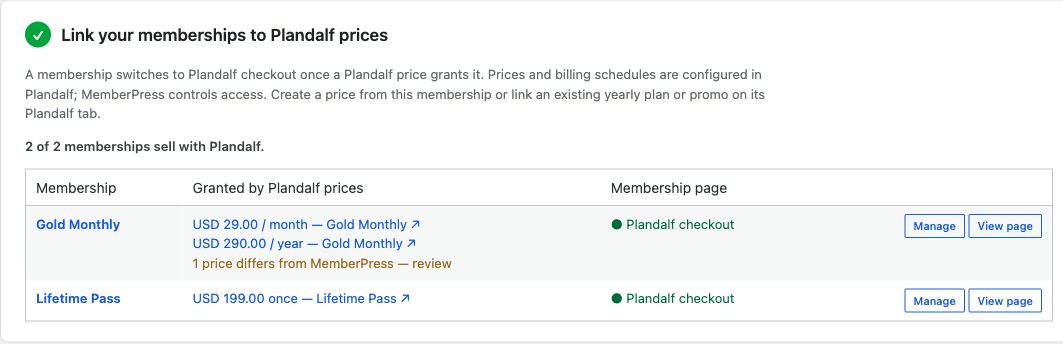
The Plandalf for MemberPress plugin is available as an open-source WordPress ZIP. It maps Plandalf checkout prices to MemberPress memberships and applies signed purchase events to membership records.

This is a source release for development evaluation. The default hosted connection endpoint is not yet deployed, so standard hosted setup cannot connect. OAuth-only account and host/domain binding is implemented in the 0.2.0 development branch and awaits hosted deployment and browser verification; version 0.1.0 uses a legacy API-key exchange. Keep existing live checkouts in place until hosted support and buyer access are verified. Post-payment upsells and campaign-driven membership prices are not supported in this version.

Real WordPress plugin settings mapping monthly, yearly and one-off Plandalf prices to MemberPress memberships.

See the setup guide, integration overview, and launch post.

Fixed · Improved · New

Fix text styling affecting the wrong block in editor, and 13 more updates

Fix text styling affecting the wrong block in editor

Changing size, weight, font or colour on a text run now only affects the block you selected, and checkouts that hit a save error can be saved again.

Editor now warns loudly when saves fail

The checkout editor now shows a clear banner when saving keeps failing, lets you copy your changes to keep them safe, and no longer blanks out when a block crashes.

Verify logged-in customers reliably at checkout

Identifying a signed-in customer now confirms the result before checkout opens, so a misconfigured signing key no longer slips through as an anonymous session.

Quickstart install step completes automatically

The ‘Install the Script or SDK’ quickstart step now ticks itself once you have a real checkout session, so a working install no longer shows as incomplete.

Preview and Test now open on the first page

Builder Preview and Test now start on the first page of your checkout instead of resuming on whichever page a visitor last reached.

New guided tour for the checkout preview bar

The first time you open Preview, a quick tour shows how to jump between pages, check device sizes and test your checkout safely. Replay it anytime with the help button.

Fix clipped template previews

Template previews now scale the full checkout to fit instead of shrinking it, so designs no longer get clipped on smaller windows.

Upgrades and add-ons preserve your other subscriptions

Buying an upgrade or add-on now changes only the subscription you specify and leaves your other plans, add-ons, trials, and billing dates untouched.

Paused account screen and upgrade checkout everywhere

When your trial ends, your account is paused and the upgrade checkout opens from the billing page, header and paywalls so you can subscribe and get back to work.

Launch affiliate programs with recurring commissions

Create affiliate programs with partner links, track referrals through checkout, and earn recurring commissions. Pay partners via manual payments or PayPal exports.

Keep access during failed renewal retries

If a renewal charge fails, you now keep access while Stripe retries payment, instead of being downgraded immediately. Access only ends if the payment ultimately fails.

Removed incorrect subscription required warnings

Trial organisations no longer see inaccurate alerts warning that a subscription was required after their first order.

The Test mode link from the Share screen now reliably opens checkout in test mode, so test cards work and a real card can no longer be charged by mistake.

Fix checkout failures on tiered prices

Tiered prices with graduated per-unit amounts now reach Stripe correctly, so checkouts for these plans no longer fail at payment.

September 2026

Test mode on your own site, and your Stripe coupons

Show all 5 changes

Test mode on your own dev site

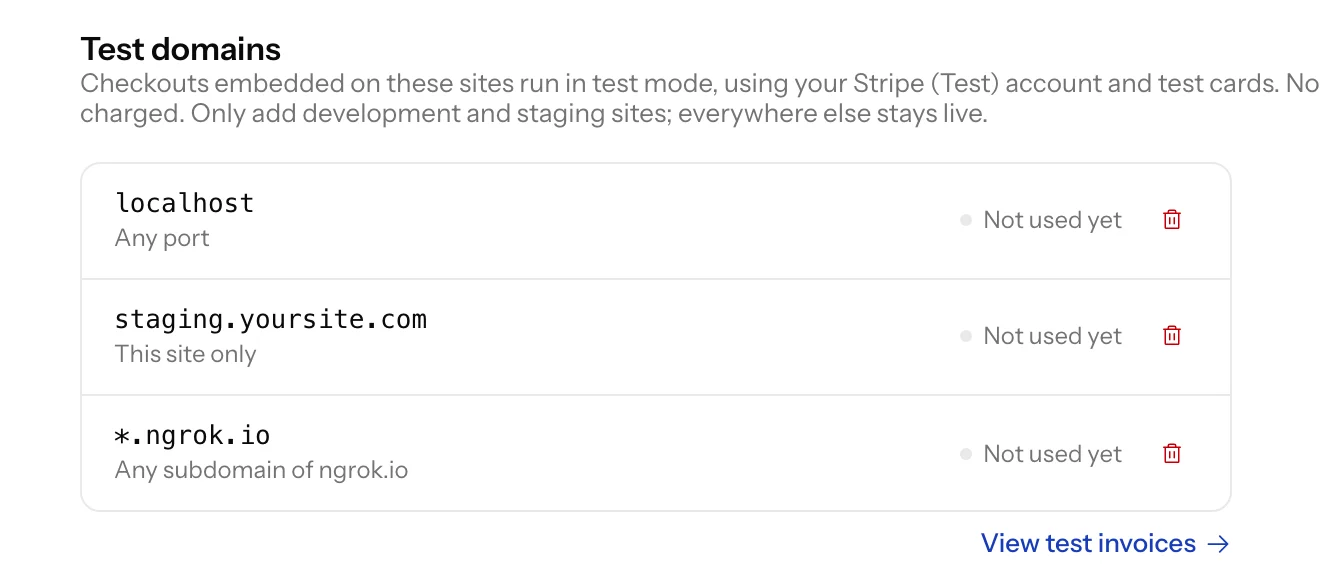
Add your development domains under Settings, Advanced. Checkouts embedded on those sites run in test mode on their own, with test cards and no login, and test purchases do not run your sequences unless you switch that on.

Test domains in Settings, Advanced, listing localhost, a staging site and every ngrok subdomain

Connect a Stripe test account yourself

Anyone on your team can now connect Stripe (Test) from Payments. The Invoices list gains a Mode filter so test purchases can be seen on their own, and a checkout without a test account says it will run live rather than calling itself a test.

Your Stripe coupons, in Plandalf

The Coupons page reads the coupons in your Stripe account live and shows how often each has been redeemed. Import the ones you want to edit, one at a time. A Stripe coupon entered at checkout now also comes off the total the buyer sees.

A walkthrough the first time you open the builder

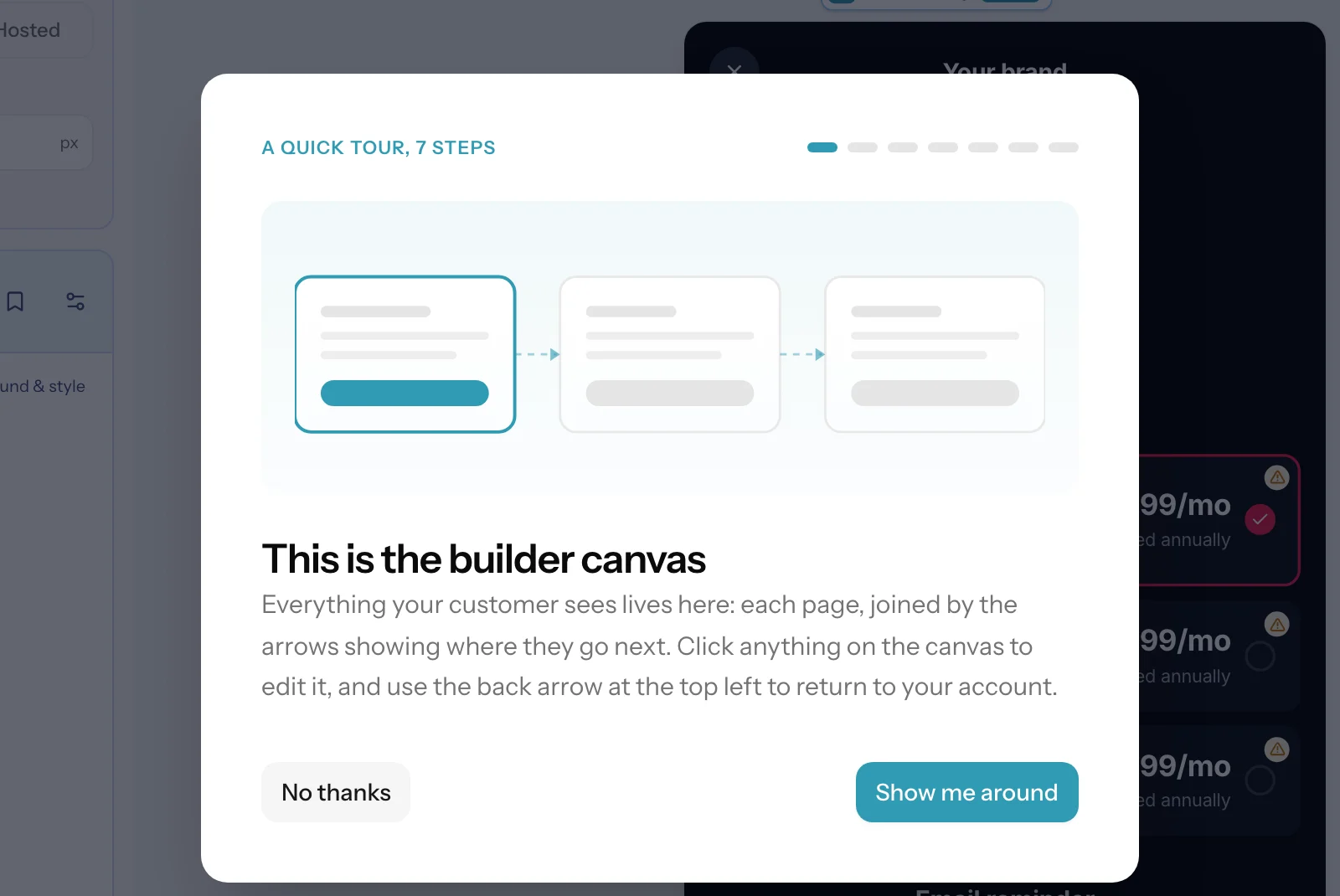
Seven short steps point at the real controls: the canvas, Layout, Elements, Products, Themes, where your work saves and where undo lives, and Preview and Share.

The first step of the builder walkthrough: this is the builder canvas

identify() keeps your Stripe customer

When your identify() token names an existing Stripe customer, checkout now uses that customer instead of creating a new one.

Edit your products and prices from the checkout builder

Show all 5 changes

Edit your products and prices from the checkout builder

The Products panel now says where products come from and links to your catalogue. Change a price’s amount, billing period or trial, or rename a product, without leaving the builder. Removing a price from one checkout and deleting it from the catalogue are now separate actions, and a delete tells you which other checkouts use it first.

Tiered Stripe prices charge the right amount

Graduated, volume and package prices imported from Stripe now show and charge their real amount at checkout.

Import from Stripe works before you connect Stripe

The add-product dialog now walks you through connecting Stripe first, then carries on with the import.

Hosted checkouts are more reliable

Long-time visitors no longer get stuck on a blank checkout, and a checkout with an empty Feature List caption saves again.

The editor stops saving once your work is saved

The builder no longer sits on “Saving…” while you are idle.

New · Improved · Fixed

Talk to the Plandalf team without leaving the app

Show all 3 changes

Talk to the Plandalf team without leaving the app

A chat button now sits in the dashboard and the checkout builder. A person on the team answers every message, and if you have gone by the time we reply, the answer comes to your email.

Clearer message when we cannot reach your website

Brand import now tells you which address it could not reach instead of a raw connection error.

Template previews open on page one

Previewing a template now always starts on its first page, not the page you last looked at.

August 2026

New · Improved · Fixed

Put your checkout live from a rebuilt Share tab

Show all 5 changes

Put your checkout live from a rebuilt Share tab

The Share tab now starts with one choice, On your site or Hosted link, then gives you install steps for your platform (Shopify, WordPress, Webflow, Squarespace, Framer, Kajabi or plain HTML) and previews each frame, such as centred box, side panel or bottom sheet, as your visitors will see it. If switching destination changes the shape of your design, the Share tab tells you and gives you a way back.

Show plans as side-by-side cards

Product options (previously Product List) has a new Cards layout that puts each plan in its own column. You can also give the Layout a different value on mobile, so plans can sit side by side on desktop and stack on a phone.

Hosted full-page layouts

When you create a hosted checkout you can now start from Hosted Modal, Hosted Modal Split or Hosted Brand Panel. Each paints its own page background and centres a modal-sized card on it, so your hosted page looks like the same checkout your visitors see in a popup.

Try a template before you use it

The template picker now shows the real, interactive checkout instead of screenshots. You can switch plans, fill in fields, step through every screen and use Skip payment to see the confirmation page, and nothing is charged or saved.

Fixes for saving and embedding

Checkouts that kept showing “Failed to save checkout” now repair themselves on the next save, new checkouts start as “Untitled Checkout” so the first save goes through, and the modal size no longer reverts in the editor. In the SDK, calling flow.close() now settles the promise returned by present(), and the side panel, bottom sheet and full overlay frames now animate in and out properly.

July 2026

New · Improved · Fixed

Let customers expand and collapse sections

Show all 5 changes

Let customers expand and collapse sections

The new Show / hide toggle element opens and closes one or more sections when clicked, with its own open and closed labels and icons and an optional slide. It works well for “see all features” or FAQ style content.

Share a design in one click

On the Share tab, Share design now copies a link to your clipboard straight away, and you can stop sharing at any time. The tab has also been reorganised so install options and previews are easier to follow.

Fill quotes from your own website

Quote elements have a “Prefill from my site” option that finds real testimonials on your website and lets you choose which one goes in each quote.

Show plans as side by side cards

Product List is now called Product options and gains a Cards layout that places plans side by side. You can pick a different layout for mobile, for example cards on desktop and rows on a phone.

A new paywall template, and fewer save errors

The Calorie Tracker Paywall template is now in the template picker. We also fixed checkouts that could refuse every save because of an old setting, and elements that could turn invisible when a theme colour could not be found.

New · Improved

Describe a theme and we will build it for you

Show all 5 changes

Describe a theme and we will build it for you

Choose “Describe with AI” when you create a theme, type something like “purples and blues, modern”, and you get a complete theme to fine tune. You can also do this from the theme panel inside the checkout builder.

Offers are now called Checkouts

Across the dashboard and builder, Offers are now Checkouts, and dashboard links use /checkouts. Old links redirect, and nothing changes for your customers, your checkout links, the SDK or the API.

Pick a layout when you start from scratch

Creating a checkout from scratch now opens a layout picker, including new layouts with a pinned header or a pinned footer that stay put while the content above or below scrolls.

Add a Discount Code field anywhere

Discount Code is now its own element in the Payments section, so you can place a coupon field wherever you like instead of only inside the Order Summary.

Smart transitions between pages

A new Smart page transition moves the elements two pages share into their new spot and fades in the rest, so a step feels like one continuous screen.

New · Improved

Animate the move between checkout pages

Show all 5 changes

Animate the move between checkout pages

Each page in your flow can now have a transition: fade, slide, slide up or zoom, with a Fast, Normal or Slow speed. Slides follow the direction of travel, and transitions respect your customer’s reduced motion setting.

Buttons that show or hide a section

A button can now use the “Show / hide section” action to reveal or collapse a section in place, with an optional slide. You can also start a section hidden, and use a new “Go to page” action to move within the flow.

One text colour for your whole theme

Themes now have a Text Color setting that sets the default colour for headings, body and label text in one place, plus new button padding and button typography settings. You can still override any of them per element.

Colour your payment tabs

You can now set the text and background colours of the payment method tabs, and the text colour inside the payment form, so the payment step matches the rest of your checkout.

Sign in with Google

The sign up and log in pages have a fresh look and a Continue with Google option.

New · Improved · Fixed

Route customers by the option they pick

Show all 5 changes

Route customers by the option they pick

Page branching has a new “Option selected” condition, so a plan choice in a Product List, Radio List or Option Selector can send customers to the right next page. Each branch now shows only the price for its own route, even if a customer goes back and changes their pick.

Embedded popups match your modal size

A checkout opened as a popup through the SDK now uses the width, height and corner radius you set in the Display panel, so it looks the same on your site as it does in the builder.

Trial and subscription checkouts complete as expected

We fixed an error that could stop a checkout with a free trial or a recurring plan from confirming payment details.

A clearer pricing model picker

When you create a price, the pricing models are now grouped into simple and usage based options, with a short example under each one.

Text keeps a clean fallback font

If a web font fails to load, your checkout text now falls back to a sans serif font instead of switching to a serif one.

New · Improved

Show exact prices with the new Price Line element

Show all 5 changes

Show exact prices with the new Price Line element

You can now add a Price Line to any checkout page. It shows an amount worked out from the cart, such as due today, next charge, subtotal, tax or total, with an optional label and date like the trial end, so trial and subscription pricing always reads correctly.

Show and hide rules that read like a sentence

The visibility dialog has been rebuilt so each rule reads as a plain sentence, and you can now choose whether a match shows or hides the element. Turn on “Show hidden” in the builder to see conditional elements while you design.

Branch on a specific price

Page branching can now route on the exact price in the cart, not just the item, and new branches are flagged until you connect them to a page so a branch can no longer lead nowhere.

Dates that update themselves

The Insert menu in text elements now adds a relative date, such as today plus 7 days, which your customers see as a real date on the live checkout.

Add a frosted glass effect to backgrounds

Backgrounds now have one control for Fill, Image or Video, plus a Glass toggle that frosts the background with adjustable blur, tint colour and tint opacity.

June 2026

New · Improved · Fixed

Build checkouts in a redesigned editor

Show all 5 changes

Build checkouts in a redesigned editor

The checkout editor has a new toolbar that sits above whatever you select, and you can style any selected words with their own font, size, colour, bold or italic. Undo and redo now work with Cmd or Ctrl+Z and Cmd or Ctrl+Shift+Z, deleted elements come with an Undo toast, and Reset to defaults clears an element’s style overrides.

Arrange pages and branches by dragging

Drag pages to reorder your checkout flow, or drop one page onto another to make it a branch. Add New Page lets you start from a layout or pick a page From library, and pages that can’t be reached from the start are flagged.

Save and reuse sections from the Library

Use Save as section on any element to keep it in your Library, then drag saved or prebuilt sections onto the canvas where you want them. You can also save a single page or a whole flow to the Library from the page list.

Create a theme from your website

Enter your website address under Create from a website and Plandalf builds a theme from your logo colours and fonts. Themes also get a separate Button radius, a warning with Duplicate & edit before you change a theme other checkouts share, and your theme’s Main Font now applies to checkout text.

Product options behave the way you set them

Radio, option, switch, checkbox and add-on elements share one product picker, with advanced actions like Change price or Set quantity. Deactivating an item now removes it from the order, and changing an item’s price or quantity keeps the other value instead of resetting it.

New · Improved · Fixed

Preview any checkout from the dashboard

Show all 3 changes

Preview any checkout from the dashboard

Every checkout card now has a Preview button, and live checkouts show View live. Previews open full screen with Copy link and a button to open the page in a new tab, and pop-up checkouts render the same way they do when embedded on your site.

Create a product and its price in one go

Creating a product now takes you straight to adding its price. A product’s status switches to Active on its own once it has an active price, and you can add products from your catalog to a checkout without connecting Stripe.

Results no longer goes blank on one-day ranges

Choosing a single-day date range in Results could blank the page. It now loads normally.

Keep test purchases out of your reports

Show all 4 changes

Keep test purchases out of your reports

The Dashboard, Results and Promos pages now have an Include test data toggle, off by default, so rehearsal purchases no longer inflate your numbers. Purchases made before a checkout’s go-live date count as test data automatically, and you can use Mark as test on any invoice or lead.

Receipts and invoice emails carry your brand

Order receipts and invoice emails sent to your customers now use your brand colour and your chosen receipt background, so they read as coming from you rather than from Plandalf.

Add products before you connect Stripe

You can now create a new product for a checkout without connecting Stripe first. Only selling an existing Stripe product asks you to connect.

Open a customer in Stripe from an invoice

Invoice details now have an Open in Stripe link next to View customer, so you can jump straight to the customer in your Stripe dashboard.

May 2026

Follow up with your leads

Show all 4 changes

Follow up with your leads

The new Leads page lists people who started a checkout but have not paid, marked Hot, Warm or Cold so you can filter to the ones most worth following up.

Invite teammates by email

You can now invite people to your organization by email from Team settings, and resend or revoke pending invitations. Invitees who sign up join your organization automatically.

Set an end date for a checkout

A new Availability section in the checkout editor’s Settings tab lets you set a go-live date and an end date. After the end date the checkout is archived.

New automation templates

Templates now include “Recover failed payment”, which emails customers a retry link when a charge is declined, and “Enrol buyer into a promo”, which adds buyers to one of your promos when they complete a checkout.

Browse every customer and their purchase history

Show all 5 changes

Browse every customer and their purchase history

The new Customers page lists everyone who has bought or started a checkout, with lifetime spend, invoice count and last purchase, plus search and filters. Each customer has an activity timeline of their checkouts, invoices, orders and abandoned checkouts, and you can add private notes.

Give buyers one place for all their receipts

Receipt and payment emails now link to a hosted receipt page that lists every paid invoice for that customer, each with an inline preview and a PDF download. You can choose its background colour under Customer invoices settings.

Set tax categories for Stripe Tax

With Stripe Tax as your tax provider, you can now set a tax category on each price and see on the Tax settings page whether Stripe Tax is active and where you are registered. Connecting TaxJar or Avalara now switches it on as your tax provider straight away.

Find apps and post to any Slack channel

Automation has a new Marketplace tab listing the apps you can connect, including ones that are coming soon, with a form to request an integration. The Slack Send Message action now lets you choose any channel, and a Slack notifications recipe in Templates sets up alerts for new purchases, paid invoices, refunds and upsells.

See Stripe fees next to your revenue

Plandalf now records the Stripe processing fee on each payment. Results can show Stripe fees, net after fees and your effective fee rate, and the sales CSV export can include fee and payout columns.

New · Improved · Fixed

See how your sales are doing on the new Results page

Show all 5 changes

See how your sales are doing on the new Results page

Results (in beta) shows sales, revenue, refunds, net and average sale for any date range, with a day-by-day breakdown, your top products and a filter by checkout. You can export sales to CSV from Results or the Orders page, with refunds included.

Follow up on abandoned carts and failed payments

The new Cart Abandoned trigger waits the time you choose, then fires if a visitor gave their email at checkout but never paid. The new Cart Recovery trigger fires when a customer’s payment fails, so you can send them an email with a link to try again.

Start automations from templates

Automation now has a Templates tab with ready-made sequences such as “Send customer receipt”, “Recover abandoned cart” and “Tag customer in CRM” that you can add to any checkout. When testing a trigger you can pick which recent record to use as sample data, the Send Email body has a variable picker, and invoice and upsell triggers can be limited to a specific checkout.

Refunds from Stripe show up on your invoices

Refunds you make in Stripe now appear on the matching invoice in Plandalf, with a Refunded or Partially refunded badge in the invoice list. The invoice list also shows where each buyer came from and lets you filter by source.

Dates shown in your time zone

Timestamps across the dashboard and customer-facing pages now use your organization’s time zone, and the Coupons list has an Expires column that flags expired coupons.

New · Improved · Fixed

Show your business details and buyer tax IDs on invoices

Show all 5 changes

Show your business details and buyer tax IDs on invoices

You can now add your business address and tax ID under Business details in organization settings, and they appear on PDF invoices and receipt emails with a label that fits your country (ABN, VAT, EIN and so on). Turn on “Collect Tax IDs” in tax settings and your checkout asks buyers for an optional company name and tax ID, which are saved to the customer and printed on their invoice. The PDF invoice also has a tidier layout that fits on one page.

Choose when your checkout switches to mobile

Each checkout now has a mobile breakpoint in the editor’s Settings tab, with presets for “Phones only”, “Phones + iPad portrait” and “Phones + tablets”. The editor preview also lets you pick common phone and tablet sizes, and tall hosted pages now scroll instead of being cut off.

Charge and redirect with one button

Buttons have new actions: “Purchase & Redirect to URL”, “Purchase & Close” and “Save Payment Method & Redirect to URL”. You no longer need a separate redirect setting to send buyers somewhere after they pay.

Email countdowns that keep counting

Countdown timers in emails now show a full minute of real countdown in Gmail instead of a short repeating clip, and on-page countdowns stay accurate when a browser tab has been in the background.

Pick up visitor refs from your own URL parameters

If your page builder or form tool puts the visitor’s email in its own query parameter, point the SDK at it with data-config-ref="email" on the script tag or plandalf('configure', { ref: 'email' }), so those visitors are recognised instead of arriving anonymous.

Open checkouts from your code with the new SDK

Show all 5 changes

Open checkouts from your code with the new SDK

plandalf.present() now tells you whether the customer completed or dismissed the checkout, and returns the session, customer and invoice on completion. A new <plandalf-buy-btn> tag adds a styled buy button without any CSS, and plandalf.promo(slug) gives you the current promo tier live, with events when it changes or expires.

Keep your early-bird price for enrolled leads

A new “Send unenrolled visitors to the last tier” setting in Promo settings means only enrolled leads see the early-bird price, so your promo link is safe to share publicly.

Limit coupons to specific products

Coupons have a new edit page where you can apply a coupon to all products or only the ones you pick, and set expiry, usage limits and a minimum order. At checkout, the applied coupon shows with an option to remove it.

Brand your receipt and invoice emails

Settings > Customer invoices lets you set the logo, button colour and reply-to address used on receipts and invoice emails, and send yourself a test email.

Switching a sequence off now pauses it

Inactive sequences no longer keep running. Sequences that need setup or have untested steps are flagged on the Sequences list and can’t be switched on until they’re fixed.

April 2026

Offer one-click upsells after purchase

Show all 5 changes

Offer one-click upsells after purchase

The new Upsell block adds a post-purchase offer to any checkout page. Customers accept with one click and are charged on the card they just used, and accepted upsells appear on the same receipt and invoice as the original purchase.

See, re-run and get alerted on automation runs

Each sequence now has an events page with every run, a step-by-step timeline and error details. You can re-run a whole run or a single step after fixing it, you get an email when a run fails, and a new Delay action waits before the next step.

Send Slack messages from Automations

Connect Slack with Add to Slack, then use the Send Slack Message action in any sequence, for example after Checkout Completed. You can also choose to have automation failure alerts posted to your Slack channel.

Keep prices in sync with Stripe

Changes you make to products and prices in Stripe now flow into Plandalf automatically. Each Stripe-linked price shows when it differs from Stripe, with a button to sync it.

Order emails for your whole team

In Settings > Notifications you can now send new-order emails to several people, turn them off, and send a test. Customer receipts also show the tax breakdown.

Run time-limited deals with Promos

Show all 5 changes

Run time-limited deals with Promos

The new Promos section lets you create Deadline, Early Bird, Flash Sale, Launch and Coupon promos, each with its own countdown design. Every promo gets a shareable /p/ link that starts the visitor’s timer and sends them to your checkout.

See your whole checkout flow on one canvas

The checkout builder now shows every page on a canvas, where you can drag between pages to connect them and set page logic for where each button leads. A Test button opens modal and fullscreen checkouts the way your customers see them.

Create, send and import invoices

The new Invoices section lets you create, edit and send invoices, share a payment link, download a PDF and import existing invoices from Stripe. Tax rates and coupons now have their own pages in Settings.

Connect Circle to Automations

Circle is now available in Automations, with Find or Create Member, Add Member to Space and Update Member Fields actions and a Member Created trigger.

Checkout totals match what you are charged

Fixed cases where the order summary could differ from the amount charged, or where a hidden add-on could end up in the cart. Customers who pass 3D Secure now continue to your upsell page as expected.

The team

Built by a team obsessed with conversion.

AarogornBilbertBuildoFoundoLegoli

15+ years building SaaS businesses together. Every part of Plandalf comes from a real checkout problem we’ve had to solve ourselves.

No credit card required. Nothing to migrate.

Feature detail