Divi integration

The sales stack
for your Divi site

Keep building in Divi. Paste one script into Theme Options and any Divi button can open a Plandalf checkout.

14-day free trial. No credit card required.

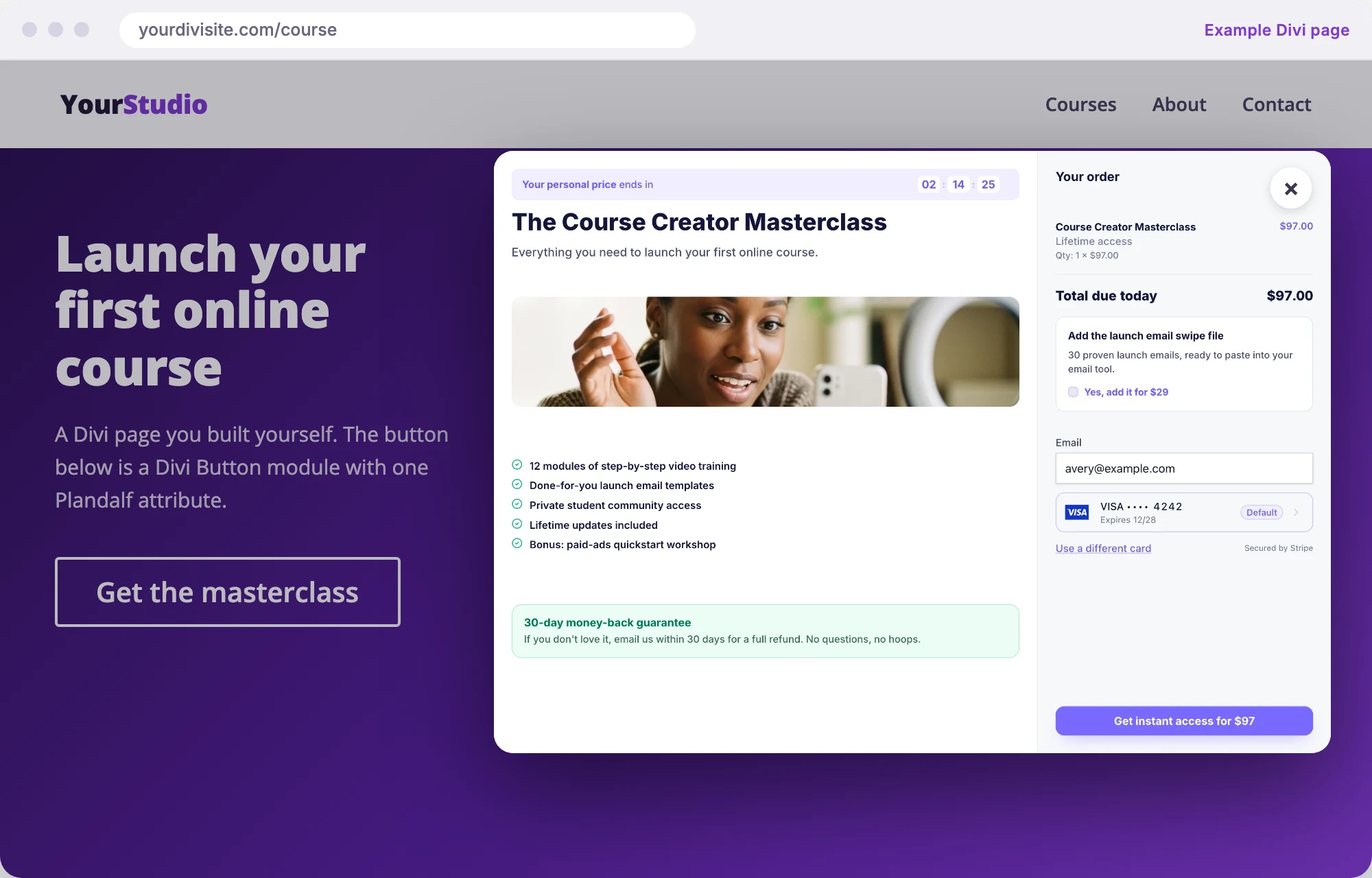
Illustration of an example Divi page with a Plandalf checkout open over it, showing a personal deadline countdown, an order bump and the pay button

How it fits

What each part of Plandalf does on a Divi site

Divi stays your page builder. Plandalf adds the checkout, the deadlines, the partners and everything after the sale.

Checkouts

A checkout on any Divi page, from your own button

Paste the Plandalf script into Divi’s Theme Options once. In Divi 5, give a Button module one attribute, and a click opens your checkout over the page. Buyers pay through your own Stripe account.

  • Your Divi button keeps its design

    You add the attribute to the Button module, and the script doesn’t change how it looks.

  • Or the whole checkout in the page

    Paste one line into a Code module to show the checkout inline, with an order bump beside the pay button.

Add a checkout to Divi →
Where the two snippets go in Divi
<!-- Divi → Theme Options → Integration, body code -->
<script async src="https://YOUR-ORG.plandalf.dev/js/plandalf-sdk.js"></script>

<!-- Button module → Advanced → Attributes (Divi 5) -->
data-plandalf-present = course-bundle

Deadline timers

A deadline that changes the price on your Divi page

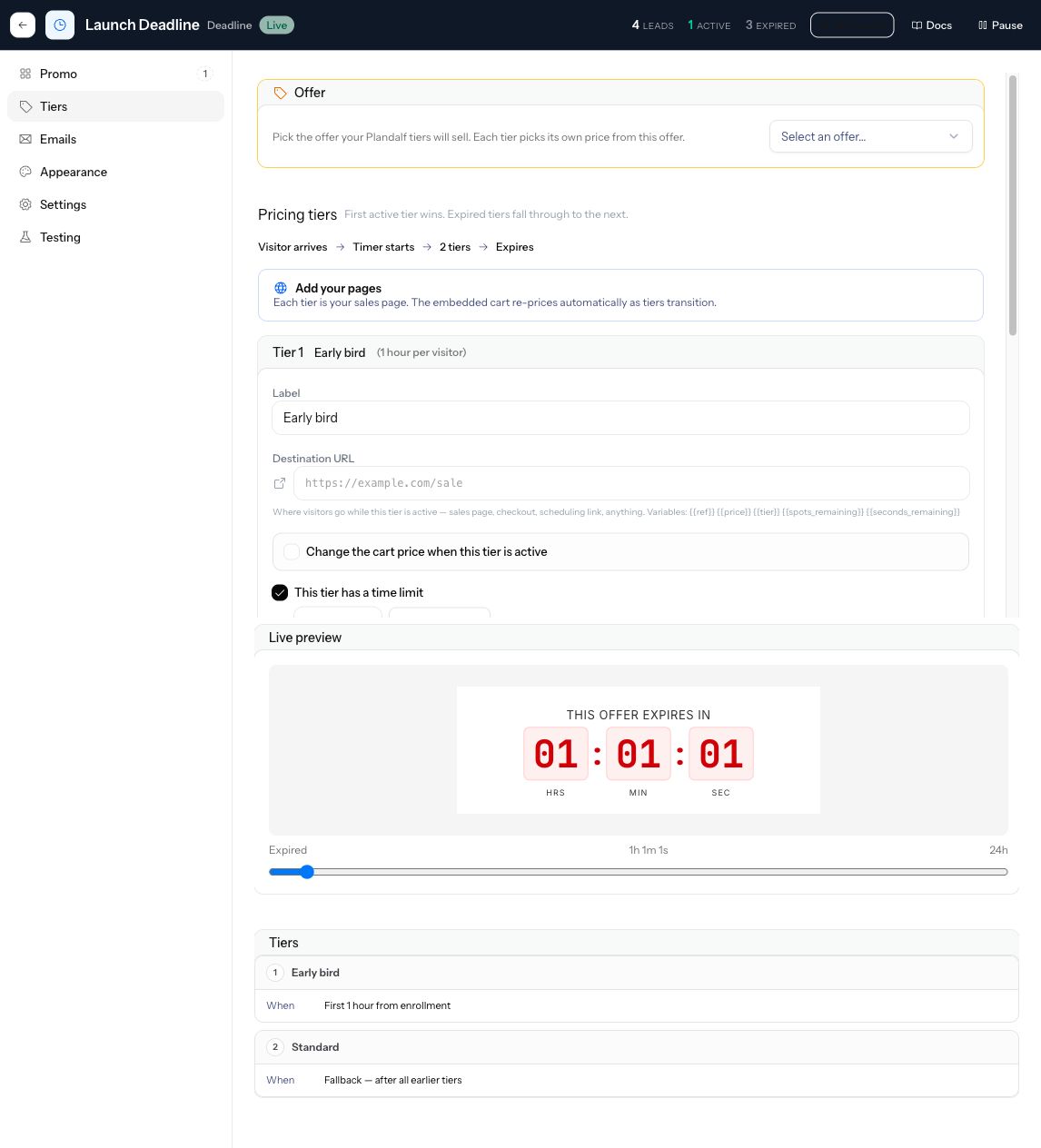
Put a countdown in a Code module and give your buy button the same deadline timer. Each tier has its own price, and the checkout charges the tier that’s live when the buyer pays.

  • Personal and short-window deadlines

    Per-visitor deadlines (Evergreen) and short-window Tripwire deadlines.

  • The price follows the clock

    With data-plandalf-apply-promo on the button, the checkout uses the deadline timer’s current tier.

How deadline timers work →
A Plandalf deadline timer: an Early bird tier that changes the cart price, its live countdown, and the Standard tier after it

Affiliates

Partners who send buyers to your Divi site

A partner shares a link to any page on your site with their code on the end. The Plandalf script in your Theme Options remembers who sent the visitor, and a sale through your checkout earns that partner their commission.

  • A portal for every partner

    Partners sign in to see their link, clicks, sales and what they’ve earned.

  • Commission waits out refunds

    You choose how many days commission is held before it’s approved, so a refund in that time cancels it.

How affiliates work →
  1. Jane shares her link
  2. A buyer checks out on your Divi page
  3. Jane earns commission on the sale

Automations

Everything after the sale

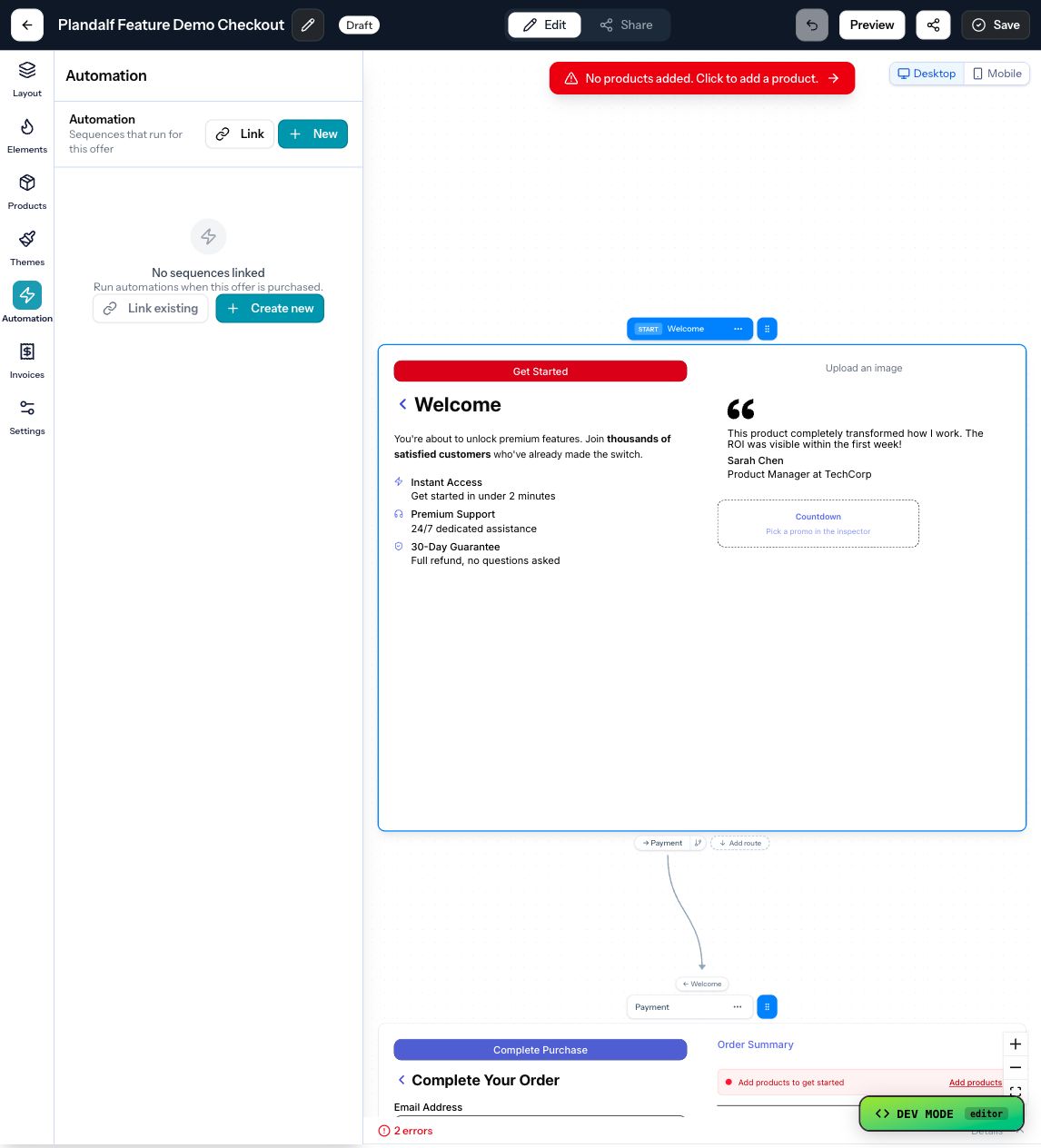
Divi builds the page, and Plandalf records who bought. A Plandalf sequence then runs on each purchase: Tag Subscriber in Kit, Find or Create Contact in GoHighLevel, Send Slack Message to the team.

  • Start from Checkout Completed

    Any sequence on that trigger runs for every sale from your Divi pages.

  • Take access back on refund

    The Remove access on refund template untags or unenrols refunded buyers in your other tools.

How automations work →
The automation tab of a Plandalf checkout, where purchases start sequences

Who does what

You keep building in Divi. Plandalf adds the checkout and what comes after it.

Divi
Your pages, layouts, theme and button styles, and the site-wide code in Theme Options.
Plandalf
The checkout, prices, the Stripe payment, invoices, deadlines, partners and sequences after the sale.
The Plandalf script
Opens the checkout from a button, shows it inline, draws countdowns and remembers which partner sent each visitor.

There’s no Plandalf module or plugin for Divi. The script, Divi 5’s Attributes group and the Code module are all it takes.

Set it up in four steps

Nothing to install in WordPress.

  1. Create a checkout

    In Plandalf, connect Stripe under Settings → Payments & Tax Integrations, then create a checkout with your product and price.

  2. Paste the script

    In WordPress, open Divi → Theme Options → Integration, enable the body code, add the script to it and save.

  3. Give a button the attribute

    Open a Button module, go to Advanced → Attributes, click + Add Attribute and add data-plandalf-present with your checkout’s slug. On Divi 4, paste the button into a Code module.

  4. Buy it yourself

    Open the Test mode link on the Share screen and pay with Stripe’s test card 4242 4242 4242 4242.

Read the full Divi guide →

Divi, Stripe and taking payments

What people ask before they change anything.

Can a Divi form take payments?

Elegant Themes’ guide to the Contact Form module covers its fields, the email it sends and a redirect after submission, and doesn’t describe taking a payment. To take one on a Divi page, open a Plandalf checkout from a button.

Do I need WooCommerce to sell on a Divi site?

No. The checkout runs in Plandalf and takes the payment through the Stripe account you connect under Settings → Payments & Tax Integrations.

Does it work on Divi 4?

Yes. Divi 4’s Button module has no custom attributes, so paste the button into a Code module instead.

What Divi support doesn’t do

  • There’s no Plandalf module in Divi’s module list. You use Divi’s own Button and Code modules.
  • A Divi 4 button can’t carry the attribute, so on Divi 4 the button goes in a Code module.
  • A site without Divi → Theme Options, such as one running the Divi Builder plugin on another theme, adds the script with a code plugin instead.

Questions about Divi and Plandalf

Is there a Plandalf plugin for Divi?

No, and you don’t need one. The script goes in Divi’s Theme Options, and a Divi 5 Button module opens the checkout with one attribute.

Which versions of Divi does it work with?

Divi 5 and Divi 4. On Divi 5 you add the attribute to a Button module. On Divi 4 you paste the button into a Code module.

Can I keep my Divi button design?

Yes. You add the attribute to the Button module, and the script doesn’t change how it looks.

Do buyers leave my site to pay?

No. Plandalf opens the checkout over your Divi page, or you put it inside the page with a Code module. If you’d rather link out, every checkout also has a hosted link on its Share screen.

What does the attribute take?

Your checkout’s slug from the Share screen, not the full checkout link.

I sell memberships with MemberPress on Divi. What should I use?

The Plandalf for MemberPress plugin. It puts your checkout on each membership page and grants the membership once the buyer pays.

Integrations

Keep your site. Upgrade how it sells.

Plus a fully documented REST API and webhook layer for whatever’s not in the list.

AarogornBilbertBuildoFoundoLegoli

Built by a team obsessed
with conversion.

Five people. The ones who answer chat also write the code.

No credit card required.

Feature detail