

Email integration
Connect your checkout to MailerLite
Find or create a MailerLite subscriber after payment, assign a group and update fields from a Plandalf sequence.
Subscriber actions are available in the builder. Complete the account and purchase replay before enabling your workflow.
 StripeMailerLite
invoice.paid
Overview
How MailerLite and Plandalf split the work
MailerLite manages subscribers and campaigns. Plandalf runs checkout and the configured purchase sequence.
Native app available
Connect the intended MailerLite account, map the paid invoice to a subscriber and choose the destination group. The guide covers setup, recipient countdowns and referral links, with a checklist for verifying the actual result.
MailerLite owns
- Subscribers, groups and fields
- Campaigns and email delivery
- Subscription preferences
Plandalf owns
- Checkout and paid invoices
- The configured subscriber actions
- Promo and affiliate purchase records
Set it up
Connect MailerLite in three steps
The short version. The MailerLite setup guide has the full walkthrough and the test-mode checks.
- 1
Connect the test account
Use the MailerLite connection form in Plandalf and verify the account. Prepare a controlled subscriber and a dedicated group with email workflows paused.
- 2
Map the paid buyer
Choose the scoped payment trigger, find or create the subscriber, then pass its subscriber ID to Add Subscriber to Group.
- 3
Verify the result in MailerLite
Reconcile a sandbox purchase with the paid invoice, sequence result, provider subscriber and group. Repeat for an existing subscriber and a duplicate event.
- Also with Promos: add a recipient countdown image to a MailerLite campaign; verify MailerLite webhook enrollment before enabling it. Promos docs →
- Read the MailerLite setup guide →
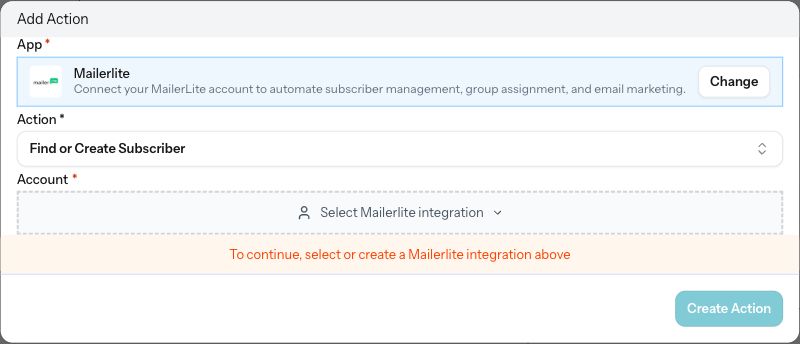
Connect the purchase and the campaign
Follow the setup for each product, then verify its customer outcome.
| Product | Set it up | Verify before launch |
|---|---|---|
| Checkouts → | An email button linking to the intended hosted checkout. | Received link, actual sandbox payment and matching paid invoice. |
| Automations → | Subscriber and group actions after the chosen paid event. | Correct provider subscriber ID, fields and group; visible failure recovery. |
| Timers / Promos → | A countdown image and purchase link sharing the participant reference. | Recipient personalization, deadline and actual checkout price across expiry. |
| Affiliates · early access → | A partner link preserved through email click tracking. | Partner on the paid sale, commission decision, refund and renewal. |
The screenshots show the real connection and action forms. Account authentication, subscriber changes, received email and the complete purchase replay are pending. Automatic enrollment from MailerLite webhooks requires separate payload and signature verification.
Read the automation scope →Integrations
Keep your site. Upgrade how it sells.
Plus a fully documented REST API and webhook layer for whatever’s not in the list.
































Questions
Common questions about MailerLite and Plandalf
The short answers. The docs have the long ones.
Which MailerLite actions are available?
Find or Create Subscriber, Add Subscriber to Group and Update Subscriber Fields. The complete provider replay is still pending.
Can checkout run inside an email?
Use a link to hosted checkout. Email clients do not run the checkout SDK or an embedded iframe.
Does a test payment isolate MailerLite?
No. Subscriber actions use the selected account and can change real records. Use a controlled subscriber and dedicated group.
Does a refund remove the buyer from a group?
The current actions do not include group removal. Define and verify any refund-driven mailing change separately.
Can a MailerLite webhook start a promo?
The receiving workflow must validate the actual webhook and map the participant reference into promo enrollment. This incoming path has not completed its provider replay.
Does a group prove affiliate attribution?
No. Match the paid invoice to the partner sale and commission in Plandalf, including refunds and applicable renewals.
The team
Built by a team obsessed with conversion.





15+ years testing every pricing model under the sun. Every part of Plandalf comes from a real checkout problem we’ve had to solve ourselves.
No credit card required. Nothing to migrate.