> Show a deadline timer's live countdown on your site, send visitors to their tier's page, and apply the tier's price to a Plandalf checkout.
Source: https://plandalf.com/docs/promos/countdowns
Deadline timers
# Countdowns on your site
Put a deadline timer's countdown on any page that has the Plandalf script. It ticks down each visitor's own deadline and keeps them on the right page for their tier.
## Add the countdown
Load the Plandalf script on the page, then add an element with your deadline timer's slug where the countdown should go:
```html
```
The countdown uses the design from the deadline timer's **Appearance** tab and fills the width of the element it's in. On a page builder, paste the element into an HTML or embed block. Your platform's guide under [Websites and builders](https://plandalf.com/docs/websites/wordpress) shows where the script goes.
## Design it
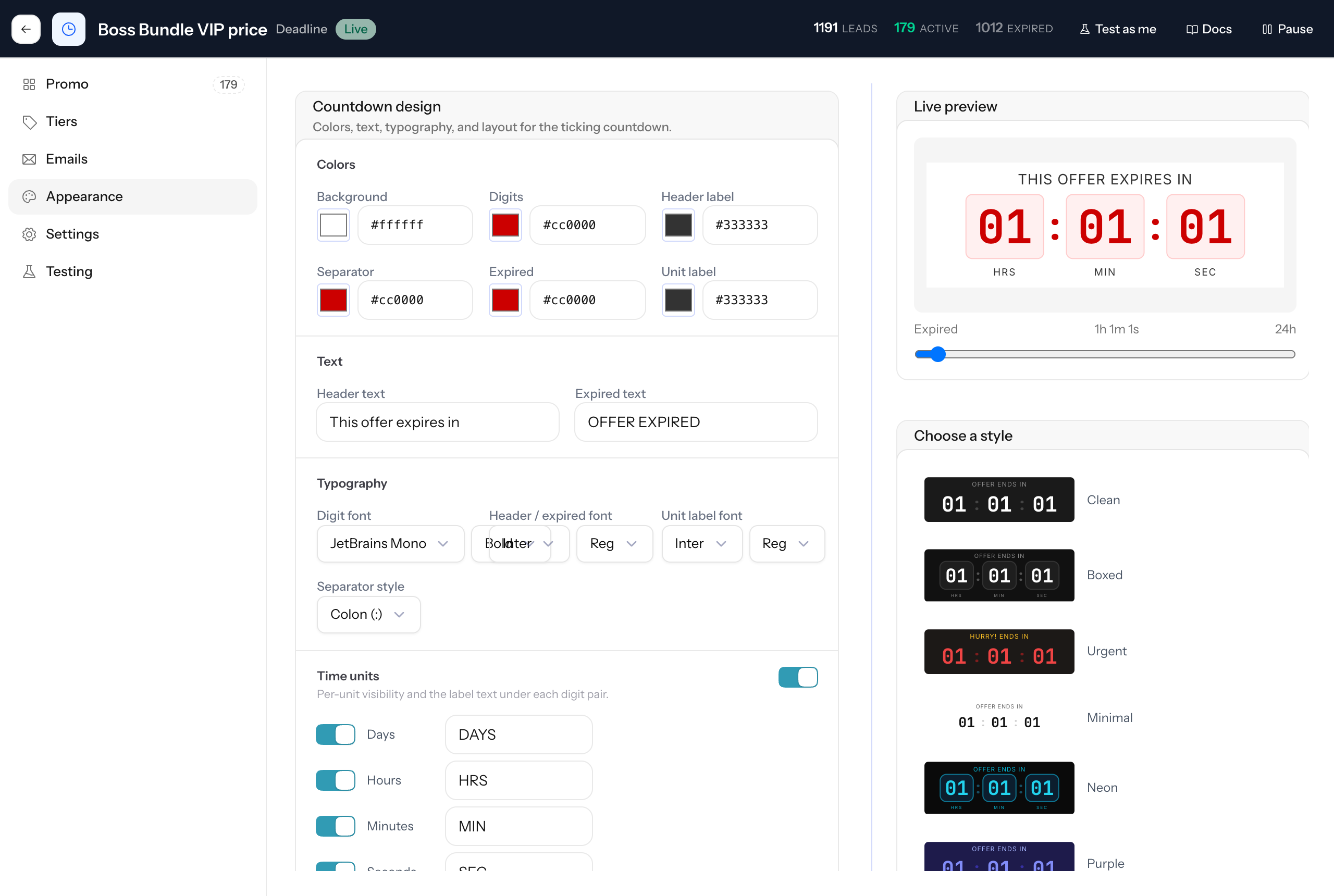
On the **Appearance** tab, pick a starting point under **Choose a style** (Clean, Boxed, Urgent, Minimal, Neon or Purple), then change the colours, the **Header text**, the **Expired text**, the fonts and which **Time units** show. Click **Save deadline timer**. The same design is used on your site and in your emails.
[](https://plandalf.com/docs/shots/promos/appearance.webp)
One design for the countdown on your site and in your emails.
## Send visitors to their tier's page
If your tiers have a **Destination URL**, the countdown element also checks the visitor is on the page for their tier. When their tier ends, or they open a page for a tier they've already passed, Plandalf sends them to the right one. It only moves people forward: someone on a later tier's page stays there. Plandalf doesn't redirect while a Plandalf checkout is open on the page.
To stop redirects on some pages, list them under **Settings → Ignore redirect on these pages**, one pattern per line:
Pattern
Matches
`/checkout/*`
Every page under /checkout
`?stay=1`
Any page opened with `?stay=1`
`*`
Every page, so the countdown never redirects
Page builder editors such as Divi, Elementor and Beaver Builder never redirect, so you can still edit a deadline timer page.
## Apply the tier's price to a checkout
Add `data-plandalf-apply-promo` to a Plandalf buy button or inline checkout. The checkout opens on the price of the visitor's active tier:
```html
```
Each tier needs **Change the cart price when this tier is active** ticked, with a price from the same checkout. See [Tiers and timing](https://plandalf.com/docs/promos/tiers). The button also sends visitors to their tier's page, the same way the countdown does.
## Show a countdown inside the checkout
In the checkout editor, add a **Timer** element and choose the deadline timer under **Counts down to**. The checkout then enrols the visitor itself, opens on their tier's price and moves to the next price when the timer reaches zero. Keep **Hide when deadline timer is inactive** on to hide the timer when the deadline timer isn't live.
## Identify the visitor
The countdown needs the visitor's ref to show their own deadline. Plandalf reads it from `?pf_ref=` in the page address, which your deadline timer link adds, and remembers it in that browser for later visits. For signed-in members, set the ref from code. See [Deadline timers from code](https://plandalf.com/docs/developers/promos-from-code).
## Deadline timer attributes
Attribute
Values
What it does
`data-plandalf-apply-promo`
Promo slug. On a `data-plandalf-present` or `data-plandalf-mount` element, the checkout it opens uses the promo's active tier price. The SDK also starts the promo's redirect monitor.
`data-plandalf-hide-on-expire`
Present on a promo countdown element: the SDK hides the element when the countdown ends (or the promo has no live config).
`data-plandalf-no-redirect`
Present on a promo element: the auto-scan skips it, so no countdown mounts and no redirect monitor starts for it.
`data-plandalf-promo`
Promo slug. On a plain element the SDK renders the promo's live countdown inside it and watches the active tier. On a `data-plandalf-present` / `data-plandalf-mount` element it is the deprecated spelling of `data-plandalf-apply-promo`.
`data-plandalf-style`
JSON object of style overrides, e.g. `{"bg":"#000"}`. On a promo widget it adjusts the saved promo style for that one widget; on a referral badge host it sets the badge's CSS variables (`--pf-`). Malformed JSON is ignored.
For events when the tier changes or the deadline timer ends, and for mounting a countdown from code, see [Deadline timers from code](https://plandalf.com/docs/developers/promos-from-code).
Something wrong or missing? Email [hello@plandalf.com](mailto:hello@plandalf.com).